¶ GPIO Programming
This chapter uses youyeetooRJ's GPIO3_PD4 as an example to explain the use of GPIO.
¶ 1 Schematic Diagram Location

¶ 2 Interface Usage
Setting GPIO 124 to User Mode
echo 124 > /sys/class/gpio/export
Setting GPIO 124 as an Output
echo out > /sys/class/gpio/gpio124/direction
Setting the Level of GPIO 124 as an Output
High Level
echo 1 > /sys/class/gpio/gpio124/value
Low Level
echo 0 > /sys/class/gpio/gpio124/value
Set GPIO 124 as an input
echo in > /sys/class/gpio/gpio124/direction
With GPIO 124 as an input, read its level: 1 for high, 0 for low
cat sys/class/gpio/gpio124/value
Cancel user-mode operation on GPIO 124
echo 124 > /sys/class/gpio/unexport
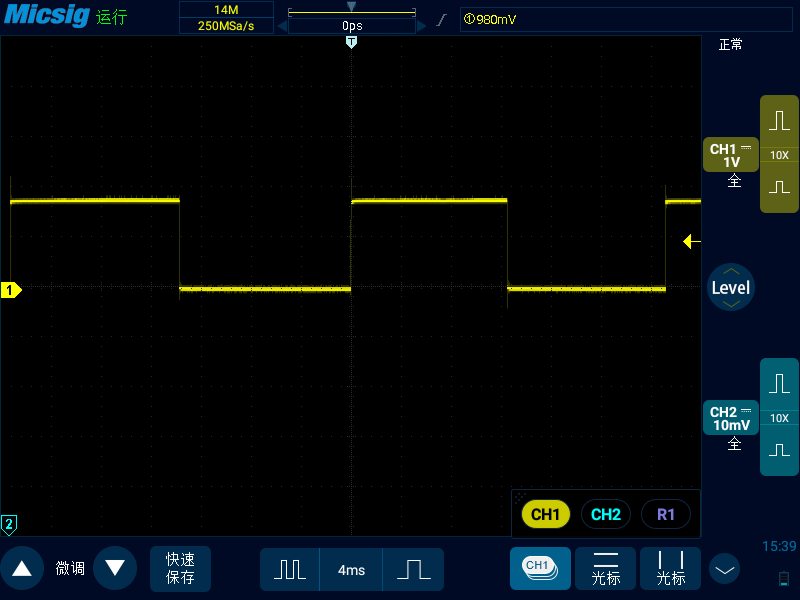
¶ 3 GPIO Output PWM Square Wave DEMO
- Readers can control the square wave period by adjusting the time parameter
cat GPOI_PWM.sh

#!/bin/bash

echo 124 > /sys/class/gpio/export

echo out > /sys/class/gpio/gpio124/direction

echo 1 > /sys/class/gpio/gpio124/value

while true; do

echo 1 > /sys/class/gpio/gpio124/value

sleep $1 && echo "delay $1"

echo 0 > /sys/class/gpio/gpio124/value

sleep $1 && echo "delay $1"

done

root@linaro-alip:/# ./GPIO_PWM.sh 0.01

delay 0.01

delay 0.01

delay 0.01

...
- Phenomenon as shown in the figure
¶ 4 Creating a Test App for GPIO
First, create the app according to the steps in the "Creating an App" section. Key code snippets are provided here for customer verification; a pre-compiled app will be provided.
Download materials, click to jump
¶ 4.1 Demo

¶ 4.2 Key code is as follows
- gpio\app\src\main\java\com\youyeetoo\rj_gpio\MainActivity.kt
package com.youyeetoo.rj_gpio

import android.os.Bundle
import androidx.activity.ComponentActivity
import androidx.activity.compose.setContent
import androidx.activity.enableEdgeToEdge
import androidx.compose.foundation.layout.Arrangement
import androidx.compose.foundation.layout.Column
import androidx.compose.foundation.layout.Row
import androidx.compose.foundation.layout.Spacer
import androidx.compose.foundation.layout.fillMaxSize
import androidx.compose.foundation.layout.fillMaxWidth
import androidx.compose.foundation.layout.height
import androidx.compose.foundation.layout.padding
import androidx.compose.foundation.layout.width
import androidx.compose.foundation.rememberScrollState
import androidx.compose.foundation.text.KeyboardOptions
import androidx.compose.foundation.verticalScroll
import androidx.compose.material.icons.Icons
import androidx.compose.material.icons.filled.Delete
import androidx.compose.material3.Button
import androidx.compose.material3.Checkbox
import androidx.compose.material3.Icon
import androidx.compose.material3.IconButton
import androidx.compose.material3.OutlinedTextField
import androidx.compose.material3.Scaffold
import androidx.compose.material3.Text
import androidx.compose.runtime.Composable
import androidx.compose.runtime.LaunchedEffect
import androidx.compose.runtime.getValue
import androidx.compose.runtime.mutableStateListOf
import androidx.compose.runtime.mutableStateOf
import androidx.compose.runtime.remember
import androidx.compose.runtime.setValue
import androidx.compose.ui.Alignment
import androidx.compose.ui.Modifier
import androidx.compose.ui.text.input.KeyboardType
import androidx.compose.ui.unit.dp
import com.youyeetoo.rj_gpio.ui.theme.Rj_gpioTheme

class MainActivity : ComponentActivity() {
    override fun onCreate(savedInstanceState: Bundle?) {
        super.onCreate(savedInstanceState)
        enableEdgeToEdge()
        setContent {
            Rj_gpioTheme {
                Scaffold(modifier = Modifier.fillMaxSize()) { innerPadding ->
                    GpioList(modifier = Modifier.padding(innerPadding))
                }
            }
        }
    }
}

@Composable
fun GpioList(modifier: Modifier = Modifier) {
    val items = remember { mutableStateListOf(124) } // 默认示例 GPIO3_D4
    var bankInput by remember { mutableStateOf("3") }
    var pinInput by remember { mutableStateOf("D4") } // 如 A0/B3/D4
    var inputError by remember { mutableStateOf<String?>(null) }
    val scroll = rememberScrollState()

    Column(
        modifier = modifier
            .fillMaxSize()
            .padding(16.dp)
            .verticalScroll(scroll),
        verticalArrangement = Arrangement.spacedBy(16.dp)
    ) {
        Row(verticalAlignment = Alignment.CenterVertically) {
            OutlinedTextField(
                value = bankInput,
                onValueChange = { bankInput = it.filter { ch -> ch.isDigit() } },
                label = { Text("Bank (例: 3)") },
                singleLine = true,
                keyboardOptions = KeyboardOptions(keyboardType = KeyboardType.Number),
                modifier = Modifier.weight(1f)
            )
            Spacer(Modifier.width(8.dp))
            OutlinedTextField(
                value = pinInput,
                onValueChange = { pinInput = it.filter { ch -> ch.isLetterOrDigit() } },
                label = { Text("引脚 (例: D4)") },
                singleLine = true,
                modifier = Modifier.weight(1f)
            )
            Spacer(Modifier.width(8.dp))
            Button(onClick = {
                val result = parseGpio(bankInput, pinInput)
                if (result == null) {
                    inputError = "格式错误,例如 Bank=3, 引脚=D4"
                } else {
                    val gpioNum = result
                    if (gpioNum !in items) {
                        items.add(gpioNum)
                    }
                    inputError = null
                }
            }) { Text("添加") }
        }

        inputError?.let { Text(it) }

        items.forEach { gpioNum ->
            GpioCard(
                gpioNum = gpioNum,
                onRemove = { items.remove(gpioNum) }
            )
        }
    }
}

@Composable
fun GpioCard(gpioNum: Int, onRemove: () -> Unit) {
    var isOn by remember(gpioNum) { mutableStateOf(false) }
    var status by remember(gpioNum) { mutableStateOf("未初始化") }
    var isInput by remember(gpioNum) { mutableStateOf(false) }

    LaunchedEffect(gpioNum, isInput) {
        runCatching {
            GpioSysfs.setDirection(gpioNum, !isInput)
            isOn = GpioSysfs.read(gpioNum)
            status = if (isInput) "已设置为输入" else "已设置为输出"
        }.onFailure { status = "初始化失败: ${it.message}" }
    }

    Column(
        modifier = Modifier
            .fillMaxWidth()
            .padding(12.dp)
    ) {
        Row(verticalAlignment = Alignment.CenterVertically) {
            Text("GPIO$gpioNum", modifier = Modifier.weight(1f))
            IconButton(onClick = onRemove) {
                Icon(Icons.Default.Delete, contentDescription = "删除")
            }
        }
        Row(verticalAlignment = Alignment.CenterVertically) {
            Checkbox(checked = isInput, onCheckedChange = { isInput = it })
            Text("输入模式(只读)")
        }
        Text(status)
        Spacer(Modifier.height(8.dp))
        Row(horizontalArrangement = Arrangement.spacedBy(12.dp)) {
            Button(onClick = {
                runCatching { GpioSysfs.setDirection(gpioNum, !isInput) }
                    .onFailure { status = "设方向失败: ${it.message}" }
            }) {
                Text(if (isInput) "设为输入" else "设为输出")
            }
            Button(onClick = {
                runCatching {
                    isOn = GpioSysfs.read(gpioNum)
                    status = if (isOn) "当前值: 1(高电平)" else "当前值: 0(低电平)"
                }.onFailure { status = "读取失败: ${it.message}" }
            }) {
                Text("读取")
            }
        }
        Spacer(Modifier.height(8.dp))
        Button(
            onClick = {
                val next = !isOn
                runCatching { GpioSysfs.write(gpioNum, next) }
                    .onSuccess {
                        isOn = next
                        status = if (next) "已写 1" else "已写 0"
                    }
                    .onFailure { status = "写失败: ${it.message}" }
            },
            enabled = !isInput
        ) {
            Text(if (isOn) "写 0(关闭)" else "写 1(开启)")
        }
    }
}

private fun parseGpio(bankStr: String, pinStr: String): Int? {
    val bank = bankStr.toIntOrNull() ?: return null
    if (pinStr.length !in 2..3) return null
    val letter = pinStr.first().uppercaseChar()
    val port = when (letter) {
        'A' -> 0
        'B' -> 1
        'C' -> 2
        'D' -> 3
        'E' -> 4
        'F' -> 5
        'G' -> 6
        'H' -> 7
        else -> return null
    }
    val offsetPart = pinStr.drop(1)
    val offset = offsetPart.toIntOrNull() ?: return null
    if (offset !in 0..7) return null
    return bank * 32 + port * 8 + offset
}
- gpio\app\src\main\java\com\youyeetoo\rj_gpio\GpioSysfs.kt
package com.youyeetoo.rj_gpio

import java.io.File
import java.io.IOException

/**
 * 简单 sysfs GPIO 读写工具:支持指定 GPIO 号。
 * 需具备写 /sys/class/gpio 权限(system/priv-app 或 root)。
 */
object GpioSysfs {
    private val exportFile = File("/sys/class/gpio/export")
    private val unexportFile = File("/sys/class/gpio/unexport")

    @Throws(IOException::class)
    fun ensureExported(gpioNum: Int) {
        val dir = File("/sys/class/gpio/gpio$gpioNum")
        if (!dir.exists()) exportFile.writeText(gpioNum.toString())
    }

    @Throws(IOException::class)
    fun setDirection(gpioNum: Int, out: Boolean) {
        ensureExported(gpioNum)
        File("/sys/class/gpio/gpio$gpioNum/direction").writeText(if (out) "out" else "in")
    }

    @Throws(IOException::class)
    fun write(gpioNum: Int, value: Boolean) {
        ensureExported(gpioNum)
        File("/sys/class/gpio/gpio$gpioNum/value").writeText(if (value) "1" else "0")
    }

    @Throws(IOException::class)
    fun read(gpioNum: Int): Boolean {
        ensureExported(gpioNum)
        return File("/sys/class/gpio/gpio$gpioNum/value").readText().trim() == "1"
    }

    fun cleanup(gpioNum: Int) {
        val dir = File("/sys/class/gpio/gpio$gpioNum")
        if (dir.exists()) runCatching { unexportFile.writeText(gpioNum.toString()) }
    }
}