¶ 01 MPP Media Processing Software
¶ 1 Overview
The Media Process Platform (MPP) speeds up application development. The platform hides the complex chip-specific low-level processing from applications and exposes the MPI (MPP Program Interface) API directly to them. It supports fast development of: video input capture, H.265/JPEG encoding, H.265 decoding, video output display, video pre-processing (denoising, enhancement, sharpening), image geometry correction, image stitching, black-and-white image fusion, image stabilization, audio capture and output, and audio codec.
¶ 1.1 MPP Architecture
The MPP architecture is layered bottom-up as hardware layer, operating system layer, OS adaptation layer, media processing platform, and other drivers plus application layer, as shown below.
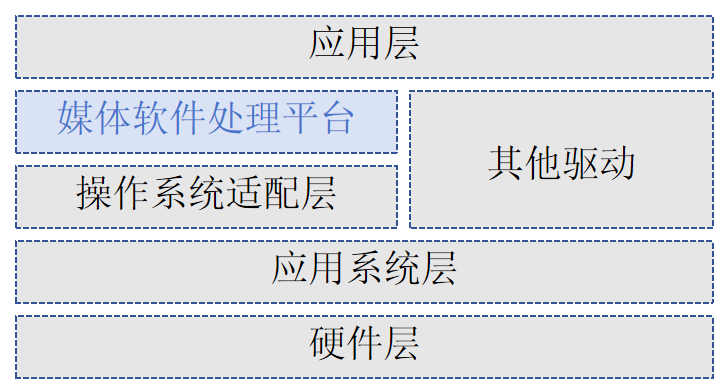
- Hardware layer: the chip and its essential peripherals, including Flash, DDR, video sensor or AD, and audio AD.
- Operating system layer: the Linux-based OS.
- OS adaptation layer: provides the base OS system-call functions and hides OS differences, so the media platform can run on different operating systems or versions.
- Media processing platform (MPP): built on the OS adaptation layer, it controls the chip to perform media processing. It hides hardware details from the application layer and exposes API interfaces to it.
- Other drivers: drivers for hardware units outside the media platform, such as CIPHER and RTC.
- Application layer: the user-developed application system built on the media platform and other drivers.
¶ 1.2 MPP Video Stream
Note
"VI online/offline" in this document refers to the online/offline mode between VI_CAP and VI_PROC. "VPSS online/offline" refers to the mode between VI_PROC and VPSS. "GDC online/offline" refers to the mode between GDC and VPSS. VI_PROC and GDC are always offline.
The MPP video stream is shown below:
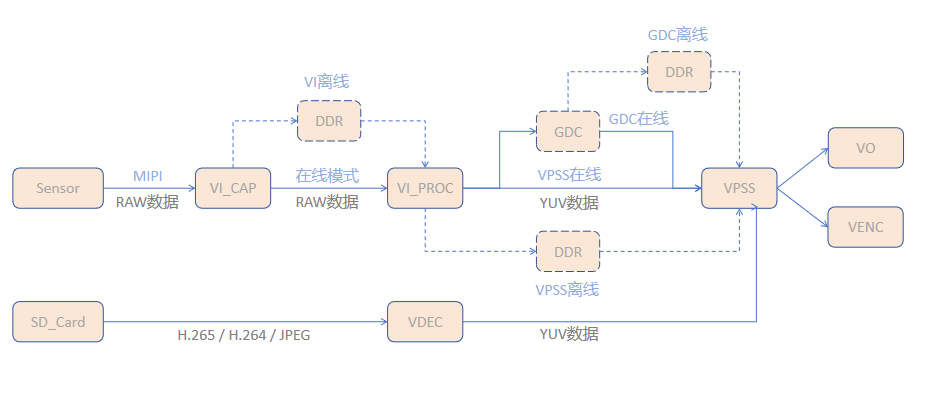
- VI_CAP module: acquires raw image data from the sensor over MIPI.
- VI_PROC module: crops and denoises the raw image, then outputs multiple streams at different resolutions.
- GDC module: performs geometric transforms such as fisheye correction, lens distortion correction, rotation, and perspective transform (optional).
- VPSS module: receives images from VI, GDC, and VDEC, applies image enhancement and sharpening/stitching, and can output multiple streams at different resolutions from the same source.
- Encoder module: receives the VPSS output and encodes it per protocol, producing the corresponding bitstream.
- VO module: receives the VPSS output, handles playback control, and drives external video devices using the user-configured output protocol.
Notes on pipe mode configuration
- For any pipe, GDC and VPSS cannot both be in online mode.
- Only pipe0 supports VI online mode.
- When pipe0 is in VI offline mode, the GDC and VPSS modes of the other pipes must match those of pipe0.
¶ 2 System Control Module
System control performs the basic system initialization according to chip characteristics. It also manages abnormal exits of MPP business modules, provides the current MPP version, provides the binding feature, manages large physical memory blocks, and configures module OST and QOS values.
¶ 2.1 SYS Module Initialization and De-initialization
SYS module initialization sets the working mode of each module in the pipe. Any MPP service must be preceded by system initialization, and system de-initialization must follow when the service ends to release resources. Example (required header: xmedia_sys.h):
xmedia_s32 mpp_sys_init()
{
    xmedia_s32 ret = XMEDIA_SUCCESS;
    ret=xmedia_sys_exit();
    if(ret!=XMEDIA_SUCCESS)
    {
        printf("xmedia_sys_exit failed !\n");
        return ret;
    }
    xmedia_sys_config sys_config={0};
    /*
     | Note:
     |  1. For any pipe, GDC and VPSS cannot both be online
     |  2. Only pipe0 supports VI online mode
     |  3. When pipe0 is in VI offline mode, the GDC and VPSS modes of the other pipes must match pipe0
     */
    sys_config.pipe_mode[0].vicap_viproc_mode = XMEDIA_WORK_MODE_ONLINE;
    sys_config.pipe_mode[0].viproc_vpss_mode = XMEDIA_WORK_MODE_ONLINE;
    sys_config.pipe_mode[0].gdc_vpss_mode =XMEDIA_WORK_MODE_OFFLINE;
    ret=xmedia_sys_init(&sys_config);
    if(ret!=XMEDIA_SUCCESS)
    {
        printf("xmedia_sys_init failed !\n");
        return ret;
    }
    else
    {
        printf("xmedia_sys_init success !\n");
        return XMEDIA_SUCCESS;
    }

}
Usage notes
- In a single process, repeated initialization still returns success but has no effect on the running MPP state; the first configuration wins. To change it, call
xmedia_sys_exitfirst.- With multiple processes, every process must initialize, and only one effective configuration (non-empty input) is supported. If process A has initialized with non-empty input, other processes must pass the same input or empty input. If A initialized with empty input, other processes' initializations are unaffected.
- VI and VPSS on the same data path must use the same pipe number.
¶ 2.2 Video Buffer (VB) Management
The video buffer pool provides large physical memory blocks to media services. It allocates and recycles memory so that physical memory is shared sensibly across media modules. A video buffer pool is a set of equally sized, physically contiguous blocks. Common video buffer pools must be configured before any MPP service. Depending on the service, the number of common pools, the block size, and the block count differ.
- Common pool configuration: several common pools can be configured, each containing a number of equally sized blocks. Use the
commont_poolmember ofxmedia_vb_cfgto set the pool count plus each pool's block size and block count.- Block size: computed from the largest image resolution and pixel format in your service; obtain it with
xmedia_vb_get_buffer_config. - Block count: estimated from the number of concurrent streams. Too few blocks cause block allocation failures; too many waste memory.
- Block size: computed from the largest image resolution and pixel format in your service; obtain it with
- Module-private pools: besides common pools, some modules (such as ISP and VDEC) support private pools for specific optimizations, configured through the
supplement_configmember ofxmedia_vb_cfg. - Acquiring and releasing blocks:
- Acquire:
xmedia_mpi_vb_get_blocktakes a free block from the specified common pool. - Release:
xmedia_mpi_vb_release_blockreturns it. Blocks must be released, otherwise the pool is exhausted.
- Acquire:
Note
Because other modules depend on the common pools, VB initialization must run before the other modules initialize (after SYS initialization). It may be called repeatedly and still returns success, but only the first configuration takes effect.
xmedia_s32 mpp_vb_init()
{
    xmedia_s32 ret = XMEDIA_SUCCESS;

    ret = xmedia_vb_exit();
    if(ret!=XMEDIA_SUCCESS)
    {
        printf("xmedia_vb_exit failed !\n");
        return ret;
    }

    xmedia_vb_config vb_config={0};//must zero the config first, otherwise random non-zero values cause an invalid config and VB pool init fails
    /*
    #define XMEDIA_VB_SUPPLEMENT_ISP_INFO_ENABLE     1
    #define XMEDIA_VB_SUPPLEMENT_VDEC_INFO_ENABLE    (1 << 1)
    supplement_config: supplementary memory pool config; bit[0] and bit[1] are valid, other bits are invalid.
    bit[0]: 1 enables the ISP memory allocation switch, 0 disables it;
    bit[1]: 1 enables the VDEC memory allocation switch, 0 disables it.
    */
    vb_config.supplement_config=XMEDIA_VB_SUPPLEMENT_ISP_INFO_ENABLE|XMEDIA_VB_SUPPLEMENT_VDEC_INFO_ENABLE;
    vb_config.max_pool_cnt = 25;//maximum number of memory pools

    xmedia_vb_base_info vb_base_info = {0};
    vb_base_info.video_fmt = XMEDIA_VIDEO_FMT_LINEAR;//video storage format
    vb_base_info.pixel_fmt = XMEDIA_VIDEO_PIXEL_FMT_YVU_SEMIPLANAR_422;//pixel format
    vb_base_info.cmp_mode = XMEDIA_VIDEO_COMPRESS_MODE_NONE;//image compression mode
    vb_base_info.bit_width = XMEDIA_VIDEO_DATA_WIDTH_8;//data width
    vb_base_info.width = 1920;//width
    vb_base_info.height = 1080;//height
    vb_base_info.align = DEFAULT_ALIGN;//alignment
    vb_base_info.ainr_attr.ainr_en = XMEDIA_FALSE;//disable AINR

    xmedia_vb_cal_cfg vb_cal_cfg = {0};
    xmedia_vb_get_buffer_config(&vb_base_info,&vb_cal_cfg);//compute the block size

    vb_config.common_pool[0].block_size = vb_cal_cfg.vb_size;//block size = total size of one video frame
    vb_config.common_pool[0].block_cnt = 3;//block count
    vb_config.common_pool[0].map_mode = XMEDIA_VB_MAP_MODE_NONE;//VB kernel virtual address mapping mode
    /* when mmz_name stays all zero, the pool is created from the anonymous mmz zone by default */

    ret = xmedia_vb_init(&vb_config);

    if(ret!=XMEDIA_SUCCESS)
    {
        printf("xmedia_vb_init failed, ret = 0x%x !\n", ret);
        return ret;
    }
    else
    {
        printf("xmedia_vb_init success !\n");
        return XMEDIA_SUCCESS;
    }
}
¶ 2.3 Binding Mechanism
MPP supports module binding: xmedia_sys_bind lets a data receiver bind to a data source, creating the association between them (only the receiver can bind the source). After binding, data produced by the source is delivered to the receiver automatically, with no frequent application involvement. The supported bindings are listed below:
| Data source | Data receiver |
|---|---|
| VI | VPSS / MCF |
| MCF | VPSS |
| VPSS | VO / VENC |
| VDEC | VPSS / VO |
Required headers and libraries
Headers: common.h, xmedia_sys.h
Library: libxmedia_common.a
- Binding APIs:
//bind:
xmedia_s32 xmedia_sys_bind(const xmedia_chn_info *src_chn,const xmedia_chn_info *dest_chn);
//unbind:
xmedia_s32 xmedia_sys_unbind(const xmedia_chn_info *src_chn,const xmedia_chn_info *dest_chn);
Important
- A data receiver can bind to only one data source.
- VI and VDEC act as data sources and send per channel. Set the device number to 0; the SDK does not check the device number in this case. In all other cases, both device number and channel number must be specified.