¶ 01 NPU Driver and Runtime Architecture
The NPU (Neural Processing Unit) is a processor dedicated to artificial-intelligence workloads, with hardware-level optimizations for neural networks and deep learning. Compared with a traditional CPU or GPU, an NPU delivers higher throughput and lower power on AI tasks such as matrix and convolution operations, and is widely used in image recognition, speech recognition, object detection, intelligent security, and large-model inference.
The NPU software stack on the GK7206 platform uses a layered design that gives developers an efficient, flexible environment for deep neural network applications. The architecture covers the full path from low-level hardware drivers to the upper-level runtime library, and supports applications such as object recognition and image classification.
¶ 1 Software Stack Layers
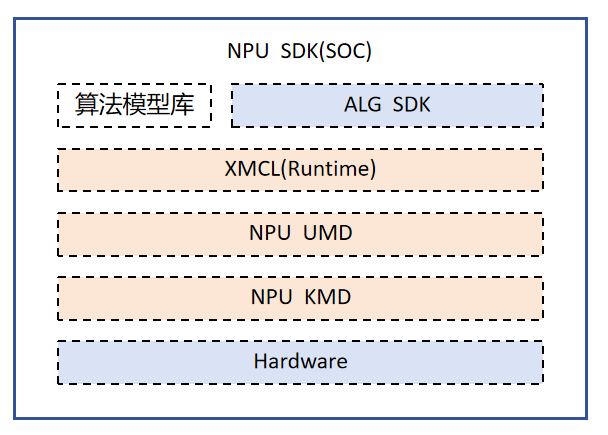
Top to bottom, the NPU software stack contains these layers:
- Application and algorithm model library (ALG SDK): ready-made algorithms for business scenarios such as object detection and image classification. Typical samples live in
sample/npu/demo_ai/, with 21 AI functions including person detection, vehicle detection, and face recognition. - Runtime layer (XMEDIA_CL): a heterogeneous programming framework designed for the NPU that exposes a C API library to upper layers, handles model loading, resource management, and task scheduling, and hides hardware differences. Core headers are
xmedia_cl.handxmedia_cl_common.h; the shared library islibxmedia_npu.so. - User-mode driver (NPU UMD): wraps the driver call logic and works with the runtime layer to issue commands and exchange data.
- Kernel-mode driver (NPU KMD): runs in kernel space and handles NPU initialization, power management, interrupt handling, memory mapping, and hardware-level task-queue scheduling. The kernel module is
xm_npu.ko, loaded with./load xm7206v11a -i. - Hardware: the NPU compute unit that executes the neural network operator instructions.
¶ 2 Core Architecture Features
XMEDIA_CL has the following key design features to ensure efficient NPU use:
- Zero-copy and ping-pong buffers: a zero-copy mode reduces memory-copy overhead, and the ping-pong buffer mechanism overlaps data movement with computation to raise throughput.
- Synchronous and asynchronous modes: both are supported. Asynchronous mode lets the CPU and NPU work in parallel for higher overall efficiency.
- JIT and AOT support: just-in-time and ahead-of-time compilation, balancing flexibility against peak performance.
- Heterogeneous device expansion: unified management and scheduling of CPU, NPU, and DSP devices.
- Low memory footprint: no internal buffering, so there is no extra memory overhead, which suits resource-constrained embedded systems.
¶ 3 NPU Hardware Specifications
¶ 3.1 Supported Data Types
The NPU compute unit supports the following data types (defined in xmedia_cl_common.h):
| Data type | Enum value | Description |
|---|---|---|
| INT8 | XMEDIA_CL_INT8 |
8-bit signed integer, the most common type for quantized inference |
| UINT8 | XMEDIA_CL_UINT8 |
8-bit unsigned integer |
| INT16 | XMEDIA_CL_INT16 |
16-bit signed integer |
| UINT16 | XMEDIA_CL_UINT16 |
16-bit unsigned integer |
| FP16 | XMEDIA_CL_FP16 |
Half-precision float, balancing accuracy and performance |
| INT32 | XMEDIA_CL_INT32 |
32-bit signed integer |
| FP32 | XMEDIA_CL_FP32 |
Single-precision float for high-accuracy scenarios |
| INT4 | XMEDIA_CL_INT4 |
4-bit signed integer for extreme quantization |
| UINT10 | XMEDIA_CL_UINT10 |
10-bit unsigned integer, for RAW image data |
| UINT12 | XMEDIA_CL_UINT12 |
12-bit unsigned integer, for RAW image data |
Tip
In practice most models use INT8 quantization, which gives the best inference performance with negligible accuracy loss. FP16 suits scenarios that demand higher accuracy.
¶ 3.2 Supported Data Formats
| Format | Enum value | Description |
|---|---|---|
| RGB | XMEDIA_CL_FORMAT_RGB |
Standard three-channel RGB |
| RGrGbB | XMEDIA_CL_FORMAT_RGrGbB |
Bayer format |
| BGbGrR | XMEDIA_CL_FORMAT_BGbGrR |
Bayer format |
| GrRBGb | XMEDIA_CL_FORMAT_GrRBGb |
Bayer format |
| GbBRGr | XMEDIA_CL_FORMAT_GbBRGr |
Bayer format |
| YUV | XMEDIA_CL_FORMAT_YUV |
YUV color space |
| YVU | XMEDIA_CL_FORMAT_YVU |
YVU color space |
¶ 3.3 NPU Management APIs
The NPU provides the following management APIs (defined in xmedia_npu.h):
| API | Description |
|---|---|
xmedia_npu_set_quick_start_flag(flag) |
Set the quick-start flag; enabling it speeds up NPU initialization |
xmedia_npu_get_quick_start_flag(&flag) |
Get the current quick-start flag |
xmedia_npu_get_proc_info(&proc) |
Get NPU memory mapping information (physical address and buffer length) |
xmedia_npu_get_usage_rate(&usage) |
Get NPU utilization as a percentage, for performance monitoring |
The example below shows how to query NPU utilization:
#include "xmedia_npu.h"

xmedia_float usage = 0.0f;
xmedia_s32 ret = xmedia_npu_get_usage_rate(&usage);
if (ret == XMEDIA_SUCCESS) {
    printf("NPU usage rate: %.2f%%\n", usage);
}
¶ 4 Core Data Types
The XMEDIA_CL framework defines a set of core structures that describe a model's input and output tensors.
¶ 4.1 Tensor Shape (tensor_shape)
Describes the tensor dimensions:
typedef struct _xmedia_cl_tensor_shape {
    xmedia_cl_u32 ndims;                      // number of dimensions (max XMEDIA_CL_MAX_DIMS_NUM=8)
    xmedia_cl_u32 dims[XMEDIA_CL_MAX_DIMS_NUM]; // size of each dimension
    xmedia_cl_u32 pch[XMEDIA_CL_MAX_DIMS_NUM]; // pitch of each dimension
    xmedia_cl_data_type type;                  // data type
} xmedia_cl_tensor_shape;
For example, an NHWC input tensor [1, 640, 640, 3] has ndims=4 and dims={1,640,640,3}.
¶ 4.2 Tensor Quantization Parameters (tensor_quant)
Describes the scale factor and zero point needed for quantized inference:
typedef struct _xmedia_cl_tensor_quant {
    xmedia_cl_float scale;  // scale factor
    xmedia_cl_s32 zp;       // zero point
} xmedia_cl_tensor_quant;
The dequantization formula is: real_value = (int8_value - zp) * scale
¶ 4.3 Tensor (tensor)
The complete tensor descriptor:
typedef struct _xmedia_cl_tensor {
    xmedia_cl_u32 tensor_id;       // unique tensor id
    void *addr;                    // data buffer address
    xmedia_cl_tensor_shape shape;  // tensor shape
    xmedia_cl_tensor_quant quant;  // quantization parameters
    xmedia_cl_u32 size;            // total data size in bytes
    xmedia_cl_s8 *name;            // tensor name
} xmedia_cl_tensor;
¶ 4.4 Input/Output Tensor Info (tensor_info_inout)
Used by xmedia_cl_graph_get_input/get_output to return tensor information:
typedef struct _xmedia_cl_tensor_info_inout {
    xmedia_cl_u32 num;                        // number of tensors
    xmedia_cl_tensor *tensor;                  // tensor array
    xmedia_cl_tensor_batch *tensor_batch;      // batch info (used for dynamic batching)
    xmedia_cl_u32 *current_batch;             // current batch size
} xmedia_cl_tensor_info_inout;
¶ 4.5 Model Memory Info (mem_info)
Describes the memory sizes a model needs at runtime, obtained with xmedia_cl_graph_query_model_info_from_file:
typedef struct _xmedia_cl_mem_info {
    xmedia_cl_u32 worksize;           // workspace size
    xmedia_cl_u32 weightsize;         // model weight size
    xmedia_cl_u32 inputsize;          // input buffer size
    xmedia_cl_u32 outputsize;         // output buffer size
    xmedia_cl_u32 codesize;           // model code segment size
    xmedia_cl_u32 memory_reuse_type;  // memory reuse mode (see section 3.6)
    xmedia_cl_u32 private_data_size;  // private data size
} xmedia_cl_mem_info;
Usage example:
#include "xmedia_cl.h"

xmedia_cl_mem_info mem_info;
xmedia_cl_s32 ret = xmedia_cl_graph_query_model_info_from_file(
    "model.xmm", &mem_info, XMEDIA_CL_MEM_INFO);
if (ret == XMEDIA_CL_SUCCESS) {
    printf("workspace: %u bytes\n", mem_info.worksize);
    printf("weight:    %u bytes\n", mem_info.weightsize);
    printf("input:     %u bytes\n", mem_info.inputsize);
    printf("output:    %u bytes\n", mem_info.outputsize);
}
¶ 4.6 Memory Reuse Modes
The NPU supports four memory reuse modes that significantly cut memory use in multi-model scenarios:
| Mode | Enum value | Reused memory |
|---|---|---|
| Workspace only | XMEDIA_CL_WORKSPACE |
workspace |
| Workspace + input | XMEDIA_CL_WORKSPACE_INPUT |
workspace + input |
| Workspace + output | XMEDIA_CL_WORKSPACE_OUTPUT |
workspace + output |
| Full reuse | XMEDIA_CL_WORKSPACE_INPUT_OUTPUT |
workspace + input + output |
Query the modes a model supports with xmedia_cl_graph_get_memory_reuse_type(). For details see .xmm Model Loading.
¶ 5 Device and Context Management
¶ 5.1 Device Types
XMEDIA_CL supports the following heterogeneous device types:
| Device type | Enum value | Description |
|---|---|---|
| CPU | XMEDIA_CL_DEVICE_CPU |
Run inference on the CPU |
| NPU | XMEDIA_CL_DEVICE_NPU |
Run inference with NPU acceleration |
| ALL | XMEDIA_CL_DEVICE_ALL |
Query all available devices |
¶ 5.2 Context Lifecycle
The context is the central object that manages all resources in XMEDIA_CL. A typical lifecycle is:
#include "xmedia_cl.h"

// 1. Initialize the CL framework
xmedia_cl_s32 ret = xmedia_cl_init();
if (ret != XMEDIA_CL_SUCCESS) {
    printf("CL init failed: %d\n", ret);
    return -1;
}

// 2. Get the NPU device ID
xmedia_cl_device_id devices = NULL;
xmedia_cl_u32 num_devices = 0;
ret = xmedia_cl_get_device_ids(XMEDIA_CL_DEVICE_NPU, &devices, &num_devices);

// 3. Create the context
xmedia_cl_s32 err_code = 0;
xmedia_cl_context context = xmedia_cl_create_context(
    num_devices, &devices, &err_code);
if (context == NULL) {
    printf("Create context failed: %d\n", err_code);
    return -1;
}

// 4. Load the model and run inference with the context...
// (see ch03-xmm-model-loading.md)

// 5. Release resources
xmedia_cl_release_context(context);
xmedia_cl_release_device_ids(&devices, &num_devices);
xmedia_cl_uninit();
Important
Before destroying a context, make sure every model graph using it has been unloaded with
xmedia_cl_graph_unload().
¶ 6 Error Codes
XMEDIA_CL defines detailed error codes (in xmedia_cl_common.h) to help you locate problems quickly.
¶ 6.1 General Errors
| Error code | Value | Description |
|---|---|---|
XMEDIA_CL_SUCCESS |
0 | Success |
XMEDIA_CL_OUT_OF_HOST_MEMORY |
-6 | Out of host memory |
XMEDIA_CL_INVALID_VALUE |
-30 | Invalid argument value |
XMEDIA_CL_INVALID_BUFFER_SIZE |
-61 | Invalid buffer size |
¶ 6.2 Device and Context Errors
| Error code | Value | Description |
|---|---|---|
XMEDIA_CL_INVALID_DEVICE_TYPE |
-31 | Invalid device type |
XMEDIA_CL_INVALID_PLATFORM |
-32 | Invalid platform |
XMEDIA_CL_INVALID_DEVICE |
-33 | Invalid device |
XMEDIA_CL_INVALID_CONTEXT |
-34 | Invalid context |
XMEDIA_CL_INVALID_COMMAND_QUEUE |
-36 | Invalid command queue |
¶ 6.3 Model Loading Errors
| Error code | Value | Description |
|---|---|---|
XMEDIA_CL_INVALID_MODEL |
-64 | Invalid model file or unsupported format |
XMEDIA_CL_READ_MODEL_FAIL |
-65 | Failed to read the model file |
XMEDIA_CL_INVALID_BINARY |
-42 | Invalid binary data |
XMEDIA_CL_INVALID_PROGRAM |
-44 | Invalid program object |
XMEDIA_CL_ERROR_MODEL_TYPE |
-68 | Wrong model type |
XMEDIA_CL_MODEL_DECOMPRESS_FAIL |
-71 | Model decompression failed |
XMEDIA_CL_NOT_FIND_FILE |
-75 | Model file not found |
¶ 6.4 Memory and Address Errors
| Error code | Value | Description |
|---|---|---|
XMEDIA_CL_INVALID_HOST_PTR |
-37 | Invalid host pointer |
XMEDIA_CL_INVALID_MEM_OBJECT |
-38 | Invalid memory object |
XMEDIA_CL_INSUFFICIENT_SIZE |
-66 | Insufficient memory size |
XMEDIA_CL_ERROR_ADDR_ALIGN |
-69 | Address not aligned (8-byte alignment required) |
¶ 6.5 Runtime Errors
| Error code | Value | Description |
|---|---|---|
XMEDIA_CL_INVALID_KERNEL |
-48 | Invalid kernel function |
XMEDIA_CL_INVALID_KERNEL_ARGS |
-52 | Invalid kernel arguments |
XMEDIA_CL_INVALID_OPERATION |
-59 | Invalid operation |
XMEDIA_CL_INVALID_UNINIT |
-60 | CL framework not initialized |
XMEDIA_CL_ALREADY_INIT |
-63 | CL framework already initialized |
XMEDIA_CL_OUT_OF_MAX_BATCH |
-74 | Exceeds the maximum batch size |
¶ 6.6 Event Errors
| Error code | Value | Description |
|---|---|---|
XMEDIA_CL_WAIT_EVENT_FAILED |
-56 | Failed waiting for an event |
XMEDIA_CL_INVALID_EVENT_WAIT_LIST |
-57 | Invalid event wait list |
XMEDIA_CL_INVALID_EVENT |
-58 | Invalid event |
¶ 7 Core Concepts and Resource Management
XMEDIA_CL manages all device resources through the context. The core concepts are:
- Device: a hardware compute unit such as the NPU, CPU, or DSP. Task queues enqueue commands onto a specific device for execution.
- Context: the resource manager. It owns the devices, the memory each device can access, each device's task queue, the programs, and the kernel functions.
- Model graph file: the binary (.xmm) produced by compiling an AI model with the toolchain; supports heterogeneous instructions.
- Task queue: queues kernel-function commands waiting to run.
- Event: marks the execution state of a task and can be used to declare explicit dependencies between tasks.
¶ 8 Task Scheduling
The context manages device resources centrally. At runtime you first load the model file; XMEDIA_CL then creates program objects and kernel functions from the graph structure, enqueues the kernel functions into the task queue, and generates the corresponding events.
Asynchronous execution: all kernel functions run asynchronously. After you submit commands to the task queue, the CPU can do other work instead of waiting for the NPU; when you do need to wait, use an event to express that dependency explicitly, which maximizes CPU/NPU parallelism.
¶ 8.1 Event States
After submission, a task moves through these states:
| State | Enum value | Description |
|---|---|---|
| QUEUED | XMEDIA_CL_QUEUED (0) |
Queued, waiting to run |
| SUBMITTED | XMEDIA_CL_SUBMITTED (1) |
Submitted to the device |
| RUNNING | XMEDIA_CL_RUNNING (2) |
Running |
| COMPLETED | XMEDIA_CL_COMPLETED (3) |
Finished successfully |
| FAILED | XMEDIA_CL_FAILED (4) |
Execution failed |
Query the current state with xmedia_cl_query_event_status(), or block until completion with xmedia_cl_wait_for_events().
¶ 8.2 Task Priority
XMEDIA_CL supports four task priority levels, set with xmedia_cl_graph_set_schedule_prio():
| Priority | Macro | Value |
|---|---|---|
| Lowest | XMEDIA_CL_JOB_SCHEDULE_PRIO_MIN |
0 |
| Medium | XMEDIA_CL_JOB_SCHEDULE_PRIO_MEDIUM |
1 |
| High | XMEDIA_CL_JOB_SCHEDULE_PRIO_HIGH |
2 |
| Highest | XMEDIA_CL_JOB_SCHEDULE_PRIO_MAX |
3 |
// set high priority
xmedia_cl_graph_set_schedule_prio(graph, XMEDIA_CL_JOB_SCHEDULE_PRIO_HIGH);