¶ 04 AI Noise Reduction (AI_NR)
AI_NR applies deep learning to denoise Bayer RAW data. Compared with traditional denoising, AI denoising removes noise more thoroughly and leaves a finer noise texture, and it delivers a higher signal-to-noise ratio in dark scenes or at very high gain, so the image stays legible.
¶ 1 Overview and How It Works
The AI_NR tool follows a "large-model distillation + small-model fine-tuning" design. Using the calibrated FPN (fixed pattern noise) and noise parameters together with a general-purpose denoising large model, it processes captured noisy RAW data to produce noisy-clean RAW pairs. Those pairs train the small model, which is then quantized and deployed on the device.
The complete workflow has six stages:
- Preprocess: prepare the data and generate training pairs.
- Float Finetune: fine-tune the floating-point model.
- Float Inference: validate the floating-point model by inference.
- Quant Finetune: fine-tune the quantized model.
- Quant Inference: validate the quantized model by inference.
- Quant Deploy: export the quantized model for deployment.
¶ 2 Environment Setup and Data Preparation
¶ 2.1 Environment Setup
- Hardware: confirm the sensor basics, including data bit width, Bayer pattern, resolution, and the ISO value corresponding to maximum again.
- Software: install miniconda and configure the environment needed to run
ai_nr.
¶ 2.2 Data Preparation
The following data must be ready before training:
- Noise parameters: the noise parameters of the sensor to be fine-tuned (five in total) and the FPN (including black level).
- FPN data: capture 100~200 black frames. The lens must be fully black during capture, the exposure time must match the darkest real scene,
againmust be at maximum,ispdgain=1, andsensor dgain=1. Note that a shorter exposure exposes fewer FPN defect pixels, so the label learns less about defect removal. Replacing the sensor requires replacing the FPN data too. - Training data: capture RAW sequences of real scenes with their metadata, AWB, and CCM information. Store each set in one folder named after its ISO value, containing
***.raw,***.txt,awb.txt, andccm.txt.
¶ 3 Training, Quantization, and Deployment Flow
Each stage is driven by editing config.yml.
¶ Stage 1: Preprocess
Generate noise-clean RAW pairs for the current distillation data with the large model.
- Configure the YML:
state: "preprocess",substate: "preprocess_sm". - Fill in parameters: set
bit,max_dgain,max_iso,bayer_pattern, andsensor_idunderdata. - Fill in noise parameters: append the sensor's Gaussian-Poisson calibration parameters (KA, KB, BA, BB, BC) at the end of the YML.
- Fill in paths: configure
fpn_dir(FPN),data_dir(distillation data),dump_pre_root(output), and theteachermodel path. - Run and check: inspect the generated input-label visualizations under
dump_pre_rootto confirm preprocessing worked.
¶ Stage 2: Float Finetune
Two-stage training of the small floating-point model.
- Configure the YML:
state: "float",substate: "float_finetune". - Training settings: set
stage(1 or 2),learning_rate,batch_size, and so on undertrain. - Model configuration: choose
net_nameundermodel, nearest to your sensor resolution (for example, 3M picks "4M", 6M picks "8M"). - Check results: training writes
input,label, andpredictimages totrain_dump; check that color and brightness correspond. Training for 60+ epochs is recommended. If the loss becomes NaN, check the FPN/sensor bit settings, or try a smaller learning rate and a larger batch size.
¶ Stage 3: Float Inference
Visually verify the floating-point model.
- Configure the YML:
state: "float",substate: "float_inference". - Input model: use the
pthwith the higher PSNR fromfloat_finetune. - Inference data: set the benchmark path;
select_isocan target a specific ISO.
¶ Stage 4: Quant Finetune
Convert the floating-point model to a quantized model in two stages.
- Configure the YML:
state: "quant",substate: "quant_finetune". - Stage 1: set
best_float_modelto the floating-point model path. Running producesquant_finetune_stage1.pth. - Stage 2: point
best_quant_modelat the stage-1 pth and keep training to producequant_finetune_stage2.pth. Training for 10+ epochs is recommended. If you add data, regenerate the.h5files and update thetrain_namelist.
¶ Stage 5: Quant Inference
Validate the quantized model: its output must be visually indistinguishable from the floating-point model, with no obvious loss of detail or color shift.
- Configure the YML:
state: "quant",substate: "quant_inference". - Input model: use the
quant_finetune_stage2pth.
¶ Stage 6: Quant Deploy
Export the ONNX model and deployment files for the TVM compiler.
- Configure the YML:
state: "quant",substate: "quant_deploy". - Key parameters:
padding_w: fixed at 32 (16 when deploying for 7206_8M).padding_h: computed as \text{padding_h} = \frac{\left(\left|\frac{h}{(\text{row_num} * 32)}\right| + p_s_ h\right) \times 16 - \frac{h}{(\text{row_num} * 2)}}one_step_deploy: set toTrueto run all three stages at once.
- Output: a
_tvm.encryptedmodel, a weights txt file, and the corresponding bin file.
Note
If deployment reports "The model has overflow!!!!", determine whether the overflow comes from Quant1 or Quant2, and test deployment with the model from the stage that did not overflow.
¶ 4 Key Configuration Parameters
¶ 4.1 Basic State Control
| Parameter | Range | Description |
|---|---|---|
state |
"preprocess", "float", "quant" |
Controls the tool's operating mode: preprocess for data processing, float for floating-point model work, quant for quantized model work. |
substate |
"float_finetune", "float_inference", "quant_finetune", "quant_inference", "quant_deploy", "preprocess_sm" |
The specific substate. For float operations set state to float; for quant operations set state to quant. |
¶ 4.2 Model Configuration
| Parameter | Description | Range |
|---|---|---|
net_name |
Model resolution, chosen nearest to the sensor resolution | "2M_3g", "2M_5g", "4M_8g", "4M_12g", "8M_19g" |
best_float_model |
Pretrained floating-point model, or the floating-point model used for quantization | user-defined path |
best_quant_model |
Pretrained quantized model, or the initial model for quantization stage 2 | user-defined path |
¶ 4.3 Training Configuration
| Parameter | Description | Range |
|---|---|---|
stage |
Training stage for floating-point or quantized models | 1 / 2 |
learning_rate |
Training learning rate | 0.000001 ~ 0.01 |
batch_size |
Training batch size | 1 ~ 16 |
¶ 4.4 Deployment Configuration
| Parameter | Description | Range |
|---|---|---|
one_step_deploy |
Quantized model deployment switch | True / False |
deploy_version |
Deployment target version | "7206", "7606" |
layer_bit |
Quantization bit width | 10 / 12 |
¶ 5 Tuning and Troubleshooting
¶ 5.1 Sensor Noise Model Calibration
Calibration accuracy directly affects pipeline quality. Points to watch:
- Make sure the sensor defect-pixel correction is off (enabling DPC can affect the noise model and sharpness).
- Make sure AE's SensorDgain is 1x (off by default in AI mode).
- After calibration, verify that the K/B curves match expectations.
¶ 5.2 Debugging the AI Pipeline
After the conventional pipeline is tuned, load the AI model and fine-tune:
- Parameter switching: in BNR, set both
ainrposswitchandcoringposswitchtopost. - Thresholds: enable AINR and set
switchthlowandswitchthhigh. Recommended:thdhigh > thdlow >= againmaxfor ISO.
¶ 5.3 FAQ
| Symptom | Likely cause and checks |
|---|---|
| Float Finetune loss is NaN | 1. Check the small images in train_dump for anomalies; 2. Check the FPN/sensor bit settings in the YML; 3. Check that input and label contents, colors, and brightness correspond; 4. Try a smaller learning rate and a larger batch size (for example 24, 32). |
| Bleed-through at very high ISO | Usually caused by temporal filtering being too strong. Disable YUVTNR first and see whether the bleed-through correlates with BayerTNR; if it does, lower the tnrmd threshold slightly. If disabling YUVTNR helps, check tnrmd and Mdwinsize in YUVTNR. |
| Moving objects look blurry | 1. Check whether YNR strength in STNR is too high; 2. Adjust the motion ghosting noise strength in BNR; 3. Adjust the K/B gain in the AINR module to tune AI denoising strength. |
| Quant Deploy reports overflow | Determine whether the overflow is in Quant1 or Quant2. Deploy the Quant1 result; if there is no overflow, the Quant2 training caused it. |
| Dead pixels, flicker, false texture | These are over-enhanced detail artifacts; enabling smooth_on mitigates them, and dead pixels can be tuned with the bpc strength. |
| Color cast | Check whether the training pairs have a color cast; if not, compare the test scene with the training scenes and add data for scenes that differ significantly. |
¶ 6 Using sample_ainr
- Step 1: Build
# run from the SDK root:
source build/env.sh
make clean
make build -j
make sample
- Step 2: Copy the executable and the neuron_network.xmm model to the board
Model path: /tools/linux/pq_board/arm-gcc12.2.0-linux-uclibceabi/configs/sc465sl/neuron_network.xmm
Important
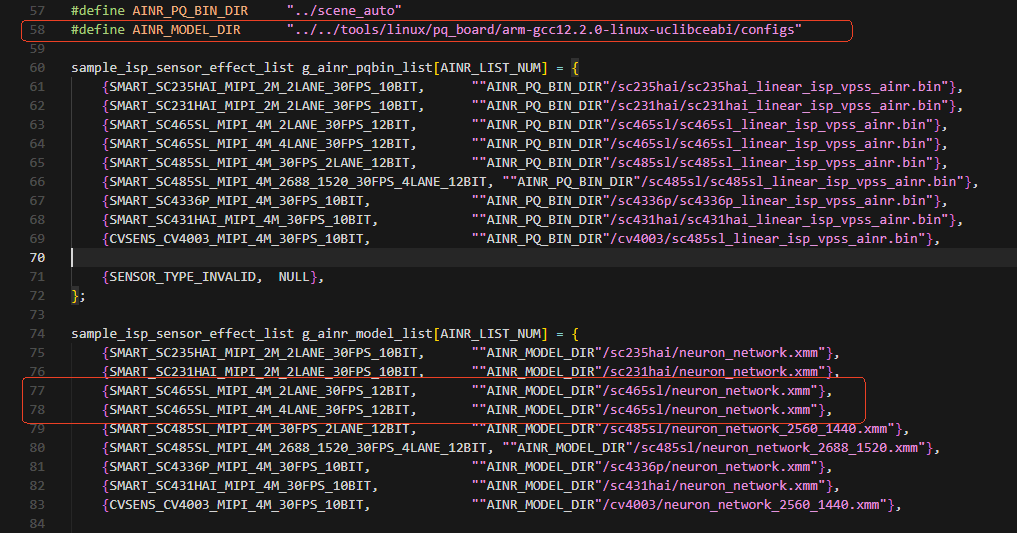
The model file and the executable must be placed on the board in a specific relative layout: the executable looks for the model at
../../tools/linux/pq_board/arm-gcc12.2.0-linux-uclibceabi/configs/sc465sl/neuron_network.xmm.
You can change the three lines in sample_comm_isp.c(56-80):
- Running sample_ainr
Parameters
Usage: ./sample_ainr [scene_mode]
scene_mode:0: single-stream linear ainr, 15fps 1: dual-stream linear ainr, 7fps (switch) 2: dual-stream linear ainr, 7fps 3: dual-stream linear ainr, 7fps (external switch) stream_mode: VENC output¶ e.g: ./sample_vio 0