¶ 02 UART Communication
¶ 1 The UART Subsystem
UART is a serial, asynchronous, full-duplex interface that sends the LSB first. Once both sides agree on the baud rate, frame length, parity usage, and stop-bit length, data is sent and received over the TX and RX signal lines. TX and RX are always relative to the device itself. On Linux, UARTs are usually managed by the kernel serial driver, and user space accesses them through device nodes such as /dev/ttyS*, /dev/ttyAMA*, and /dev/ttyUSB*. Applications typically use open/read/write/ioctl or termios to configure the port.
The UART wiring is shown below.
The UART subsystem consists mainly of the following parts:
1. tty subsystem interface
The Linux UART subsystem builds on the TTY (Teletypewriter) framework to manage serial devices, providing a unified abstraction for character terminals, consoles, and serial communication. The TTY subsystem handles serial driver registration, device management, data buffering, and user-space access control. The /sys/class/tty directory exposes the serial devices registered in the system, including device names, driver bindings, and runtime state. Reading the relevant sysfs nodes lets you inspect UART device attributes, major/minor numbers, and driver information for management and debugging.
2. UART character device nodes
The Linux kernel normally creates device nodes under /dev, such as /dev/ttyS0, /dev/ttyS1, and /dev/ttyAMA0, one per UART controller or serial device. These character device nodes give user-space programs a standard access interface: applications call open(), read(), write(), and ioctl() to communicate with a given port, covering data transmission, data reception, baud rate configuration, parity settings, and flow control. For example, a serial terminal program (minicom, picocom) or a custom application can access the UART for debug log output, command interaction, or peripheral communication.
3. Console and serial driver binding
The UART subsystem also provides the Linux console output path. During boot, the kernel can select the console device through the bootargs parameter, for example:
console=ttyS0,115200
This redirects the kernel boot log and shell output to the ttyS0 port at 115200 baud.
After initializing the hardware, the UART driver registers the underlying controller as a TTY device and maps it to the corresponding character device node, which is what carries data between user space and the hardware port.
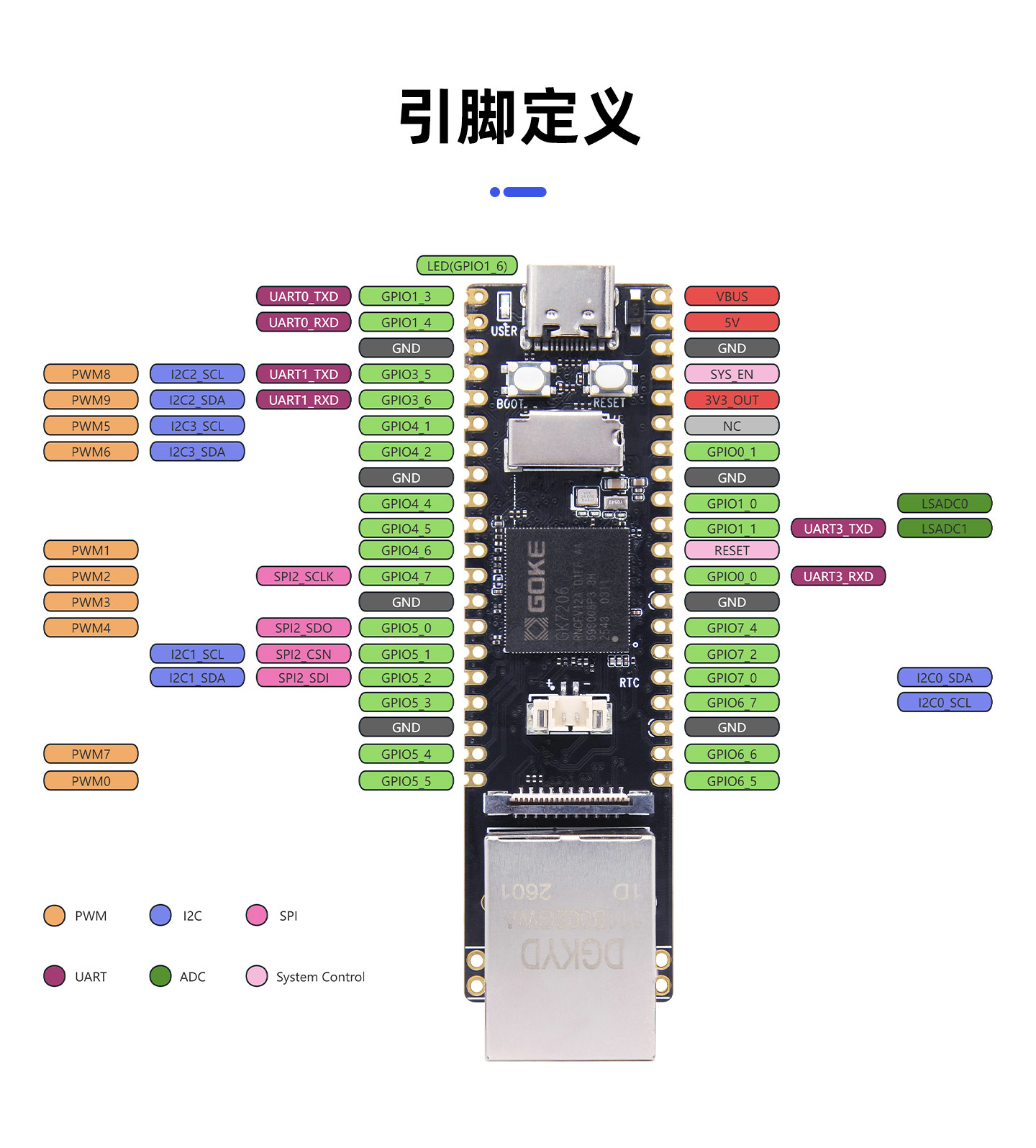
Tip
Before using a UART, confirm that the corresponding pins are configured as UART functions in the DTS rather than GPIO or another multiplexed function. 🔧 [Needs manual confirmation: mapping between UART instance numbers and pins]
¶ 2 Shell Operations
¶ 2.1 Listing the Available Serial Devices
# list all tty serial devices
ls /dev/tty*
Expected output:
/dev/tty      /dev/ttyAMA1  /dev/ttyS000  /dev/ttyp1
/dev/ttyAMA0  /dev/ttyAMA2  /dev/ttyp0
Note
- tty — the control device of the current terminal, usually meaning "the current console".
- ttyAMA0 / ttyAMA1 / ttyAMA2 — hardware UART ports 0, 1, and 2. They are typically used for debug output, connecting an MCU, attaching serial modules, or production-test communication.
- ttyS000 — another serial device name, usually registered by a different UART/serial driver. Some platforms name ports
ttyS*, othersttyAMA*, depending on the driver and platform.- ttyp0 / ttyp1 — pseudo-terminals, not hardware serial ports. They are used for shell sessions, terminal emulators, and local pseudo-terminal connections.
¶ 2.2 Checking Serial Device Details
cat /proc/tty/driver/<serial-driver-name>
Expected output:
serinfo:1.0 driver revision:
0: uart:PL011 rev2 mmio:0x12040000 irq:27 tx:12924 rx:454 RTS|CTS|DTR|DSR|CD|RI
1: uart:PL011 rev2 mmio:0x12041000 irq:28 tx:0 rx:0 RI
2: uart:PL011 rev2 mmio:0x12042000 irq:29 tx:0 rx:0 RI
Reading the output
serinfo:1.0 driver revision:— the ttyAMA serial driver is at version 1.0.
0: uart:PL011 rev2 mmio:0x12040000 irq:27 tx:12924 rx:454 RTS|CTS|DTR|DSR|CD|RImeans:
0:— port 0, which normally corresponds to/dev/ttyAMA0uart:PL011 rev2— a PL011-type UART controller, revision 2mmio:0x12040000— the memory-mapped address of this UART controllerirq:27— this UART uses interrupt number 27tx:12924— 12924 characters/bytes have been transmittedrx:454— 454 characters/bytes have been receivedRTS|CTS|DTR|DSR|CD|RI— modem control/status line flags, showing that this driver supports these hardware handshake signals
¶ 2.3 Viewing Port Parameters with stty
Using ttyAMA0 as an example.
# show the current configuration of ttyAMA0
stty -F /dev/ttyAMA0
Expected output:
/proc/tty/driver # stty -F /dev/ttyAMA0
speed 115200 baud; line = 0;
intr = ^C; quit = ^\; erase = ^?; kill = ^U; eof = ^D; eol =
; eol2 = <undef>;
swtch = <undef>; start = ^Q; stop = ^S; susp = ^Z; rprnt = ^R; werase = ^W;
lnext = ^V; flush = ^O; min = 1; time = 0;
-brkint ixoff -imaxbel
-iexten
Reading the output
speed 115200 baud— the current baud rate, i.e. a UART rate of 115200 bps.line = 0— line discipline 0 is in use.min = 1; time = 0;— parameters that governread()behavior.min = 1means a read returns as soon as one byte arrives;time = 0means no timeout, soread()blocks until themincondition is met. This is the usual blocking read mode.
¶ 2.4 Configuring Port Parameters with stty
# set 115200 baud, 8N1 (8 data bits, no parity, 1 stop bit)
stty -F /dev/ttyAMA0 115200 cs8 -cstopb -parenb raw -echo
No output means the command succeeded:
# the command succeeded and printed nothing
# confirm the settings took effect
stty -F /dev/ttyAMA0
Expected output:
speed 115200 baud; line = 0;
min = 1; time = 0;
-brkint -icrnl -imaxbel
-opost
-isig -icanon -echo
¶ 2.5 Sending and Receiving with cat and echo
# terminal 1: receive data (blocks waiting)
cat /dev/ttyAMA0
# terminal 2: send data
echo "Hello UART" > /dev/ttyAMA0
Expected output in terminal 1:
Hello UART
¶ 2.6 Common stty Settings
# set 9600 baud
stty -F /dev/ttyAMA0 9600

# 7 data bits + even parity
stty -F /dev/ttyAMA0 cs7 parenb -parodd

# 2 stop bits
stty -F /dev/ttyAMA0 cstopb

# restore 115200 8N1
stty -F /dev/ttyAMA0 115200 cs8 -cstopb -parenb raw -echo