¶ 02 Image Build
This chapter describes how to configure the SDK and build the bootloader, kernel, and root filesystem images. The SDK supports both a one-shot full build and independent builds of single modules, so it fits different development and debugging needs.
Note
The SDK provides two build methods: the
maketool and therun.shscript.
¶ 1. Building with run.sh
A one-shot build script, run.sh, is provided in the SDK root directory. It wraps the common build, clean, and information commands. The script does not require you to run source build/env.sh manually; it loads the build environment automatically.
¶ 1.1 Basic Usage
./run.sh <command> [-j[N]]
-j[N] is the optional parallel-build parameter. If N is omitted, all CPU cores are used.
¶ 1.2 Configuration and Information Commands
¶ lunch — interactive board configuration
Select the board model and kernel version from an interactive menu; cfg.mk is generated automatically:
./run.sh lunch
The interactive menu shows:
- Board model — every board configuration available under
configs/ - Kernel version — such as
linux-5.10,linux-4.9, plus the matching quickstart variant
Tip
lunchreplaces the manual chip-selection step ofmake menuconfig. It is recommended for the first build or when switching target platforms.
¶ check — verify the build environment
Checks whether the required toolchain and commands are installed, including bash, make, gcc, the cross toolchain, and fakeroot:
./run.sh check
¶ info — show current build information
Displays the configuration in the current cfg.mk, including chip model, chip architecture, kernel version, bootloader, toolchain, and Flash support:
./run.sh info
¶ env — show environment settings
Displays environment information such as the current toolchain path:
./run.sh env
¶ list — list available board configurations
Lists all available board configurations and kernel versions, and marks the one currently in use:
./run.sh list
¶ 1.3 Build Commands
| Command | Description |
|---|---|
./run.sh uboot |
Build the U-Boot bootloader |
./run.sh kernel |
Build the Linux kernel |
./run.sh rootfs |
Build the root filesystem |
./run.sh driver |
Build kernel drivers (GMP) |
./run.sh sysdrv |
Build uboot + kernel + rootfs |
./run.sh osal |
Build the OSAL adaptation layer |
./run.sh media |
Build the media libraries |
./run.sh sample |
Build the MPP sample applications |
./run.sh mcu |
Build the MCU firmware |
./run.sh all |
Build all components |
Note
./run.sh allcleans all build outputs first and then rebuilds everything; it is equivalent tomake clean && make build. For incremental builds, usesysdrvor build the target module on its own.
¶ 1.4 Clean Commands
| Command | Description |
|---|---|
./run.sh clean uboot |
Clean U-Boot |
./run.sh clean kernel |
Clean the kernel |
./run.sh clean rootfs |
Clean the rootfs |
./run.sh clean driver |
Clean drivers |
./run.sh clean sysdrv |
Clean uboot/kernel/rootfs |
./run.sh clean media |
Clean the media libraries |
./run.sh clean sample |
Clean the MPP samples |
./run.sh clean osal |
Clean the OSAL adaptation layer |
./run.sh clean mcu |
Clean the MCU firmware |
./run.sh clean all |
Clean all components |
Note
./run.sh <target> cleanand./run.sh clean <target>are equivalent; both are supported.
¶ 1.5 Parallel Builds
All build and clean commands accept -j for parallel builds:
# Build with all CPU cores
./run.sh kernel -j

# Build with 4 threads
./run.sh kernel -j4

# Full build with all cores
./run.sh all -j
¶ 1.6 Examples
A complete first build:
# 1. Select the board configuration (first time only)
./run.sh lunch

# 2. Verify the build environment
./run.sh check

# 3. Confirm the current configuration
./run.sh info

# 4. Full build with all cores
./run.sh all -j
Typical incremental builds during daily development:
# Kernel code changed: rebuild the kernel only
./run.sh kernel -j

# uboot and kernel changed: build the system drivers
./run.sh sysdrv -j

# Build the MPP sample applications
./run.sh sample -j

# Clean the kernel outputs and rebuild
./run.sh clean kernel
./run.sh kernel -j
¶ 2. Building with make
¶ 2.1 Build Steps
¶ Step 1: Configure environment variables.
Enter the SDK root directory and load the build environment:
source build/env.sh
¶ Step 2: Select the chip model
youyeetoo-Pico-G1 offers two chip models, GK7206V12A and GK7206V11A:
Tip
The setting stays in effect until you change it again; there is no need to reconfigure it for every build.
-
Chip type:
make menuconfig→Base-->Chip Type-->xm7206v12a-->save and exit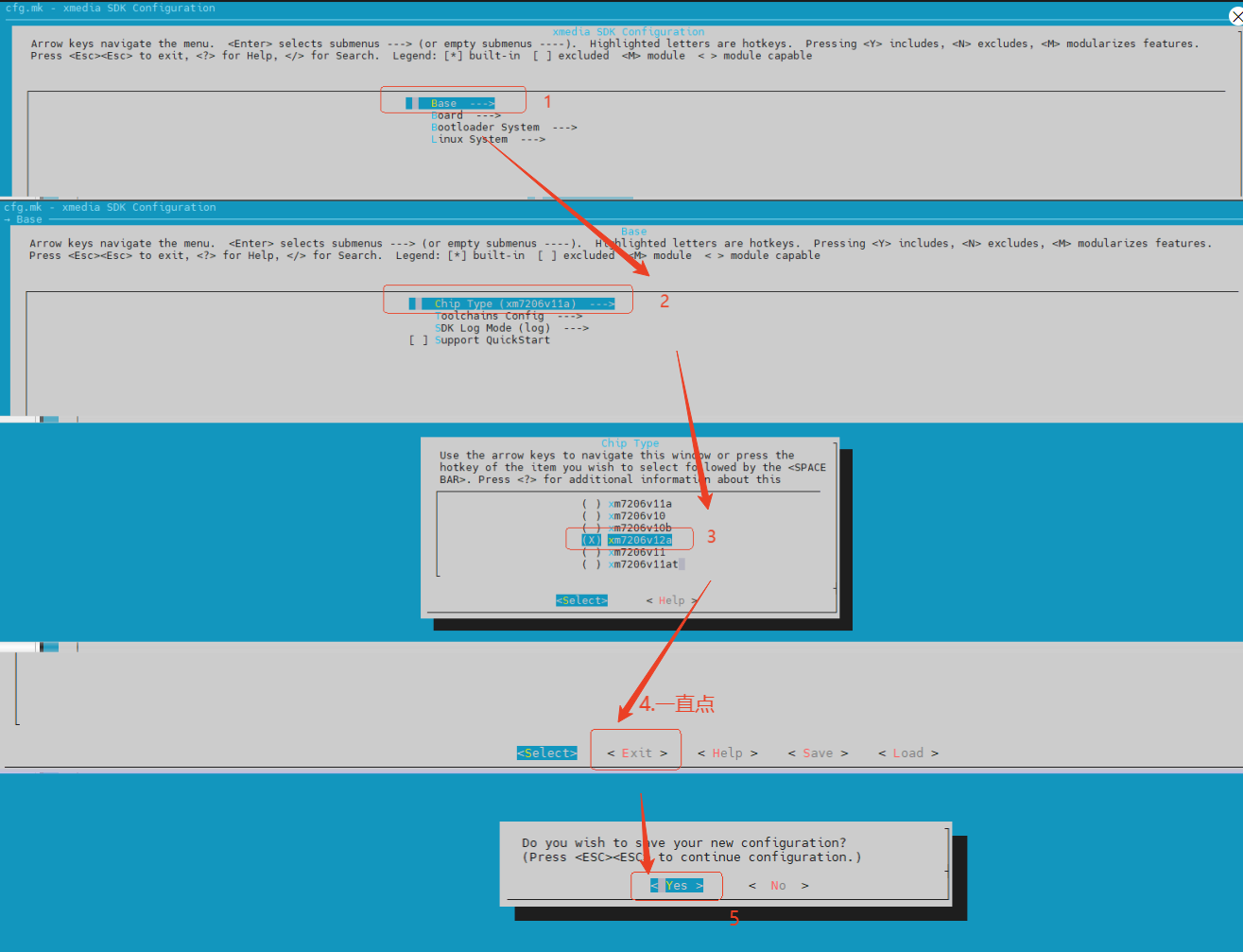
To select GK7206V11A, choose
xm7206v11ainstead. -
DDR model:
Board-->Boot Regfile Config-->XM7206V12A_EVB_6L_DDR3_2133M_256M_1x16bit-->save and exit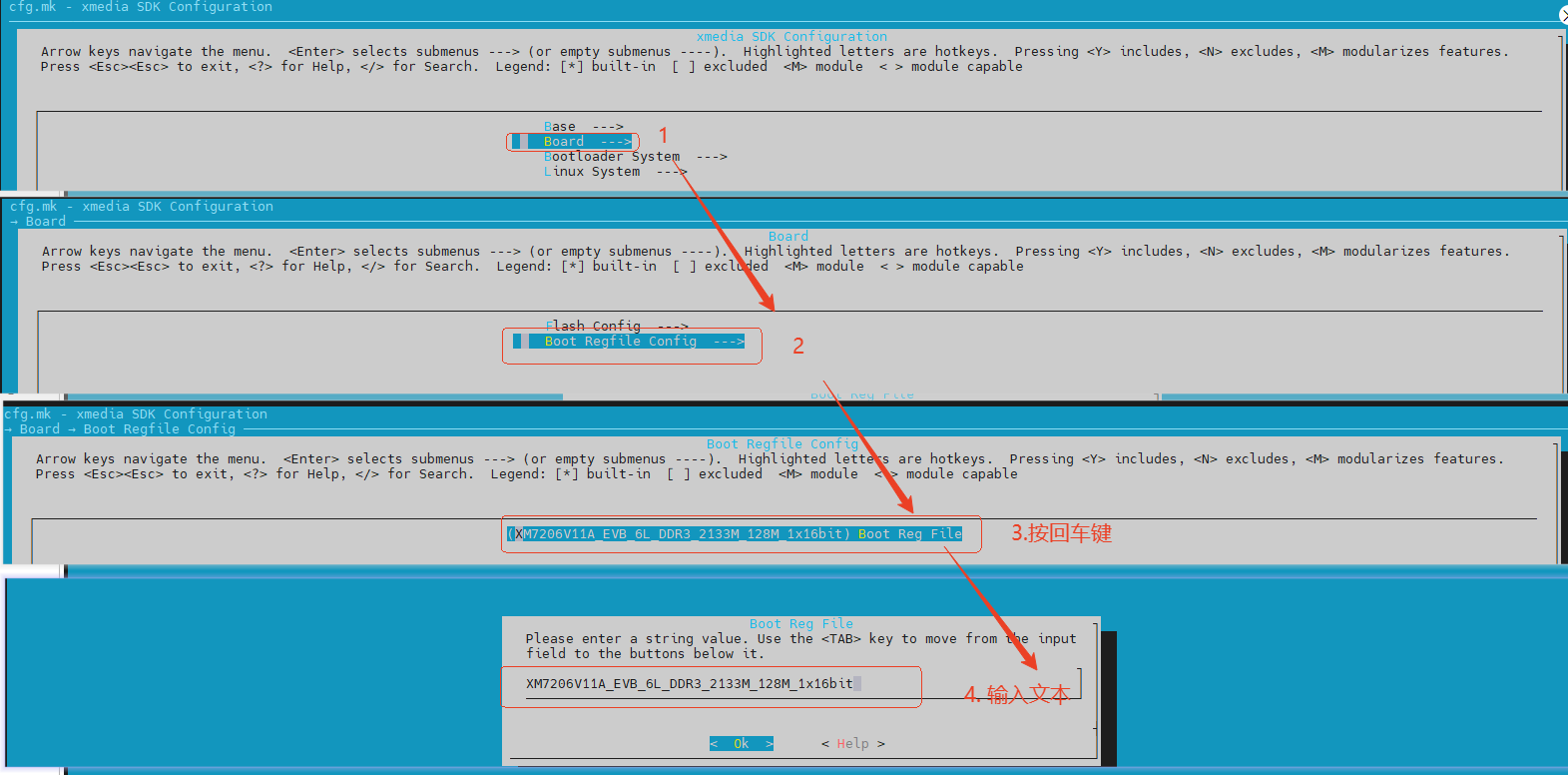
For GK7206V11A enter:
XM7206V11A_EVB_6L_DDR3_2133M_128M_1x16bit
For GK7206V12A enter:XM7206V12A_EVB_6L_DDR3_2133M_256M_1x16bit
¶ Step 3: Edit the configuration (optional).
To change the SDK's default build configuration, use menuconfig. See section 3, menuconfig configuration.
make menuconfig
¶ Step 4: Build
After saving the configuration, run the build or packaging command in the SDK root directory to produce all required images (uboot, kernel, rootfs). A full build looks like this:
make build -j
When the build finishes, the images for the target boot medium (NAND / eMMC / SPI) are generated automatically and written to out/<board_name>/image, ready for the flashing tool.
Note
The
-joption accepts a number for multi-threaded builds, for examplemake build -j16. Tune it to the CPU core count and memory of your build server to speed things up.
¶ 2.2 Other Common Build Commands
¶ 2.2.1 Full SDK build
Builds uboot, kernel, rootfs, and samples in order, then packages the images.
make build
¶ 2.2.2 Clean all SDK build outputs
Removes out/, temporary files, object files, and images — effectively returning the tree to an unbuilt state.
make clean
¶ 2.2.3 Build U-Boot only
If only source/uboot was modified, build U-Boot alone. U-Boot is the first-stage bootloader after power-on.
make uboot
¶ 2.2.4 Clean U-Boot outputs
make uboot_clean
¶ 2.2.5 Build the kernel only
If only kernel sources (for example source/kernel) were modified, build the kernel alone.
make linux
¶ 2.2.6 Clean kernel outputs
make linux_clean
¶ 2.2.7 Build the sample code only
make sample
¶ 2.2.8 Clean sample outputs
make sample_clean
¶ 3. menuconfig Configuration
¶ 3.1 Overview
menuconfig is a graphical terminal configuration tool based on the Kconfig system. It gathers the SDK's scattered configuration items into a single interface, organizing build options, chip model, toolchain, kernel version, Flash type, and filesystem type into a hierarchical text menu for interactive selection.
In the GK7206 SDK, menuconfig mainly generates and maintains the global configuration file cfg.mk. You enter the menu, choose the target chip, toolchain, kernel version, bootloader settings, and Flash type, then save to create or update cfg.mk. The top-level Makefile and build/base.mk include cfg.mk and use its CONFIG_ settings to drive the build.
Configuration options have four states:
| Symbol | Meaning |
|---|---|
[ ] or <> |
Not built |
[*] |
Built into the kernel |
<M> |
Built as a module (.ko) |
<*> |
Built into the kernel (forced) |
Tip: Press
/in this interface to open the search function.
¶ 3.2 Configuration Options
¶ 3.2.1 Top-level menu
xmedia SDK Configuration
├── Base
├── Board
├── Bootloader System
└── Linux System
¶ Base
The Base menu configures basic platform information: chip model, chip architecture, cross toolchain, log mode, and the QuickStart switch.
Base
├── Chip Type
│   ├── xm7206v11a        → target chip xm7206v11a
│   ├── xm7206v10         → target chip xm7206v10
│   ├── xm7206v10b        → target chip xm7206v10b
│   ├── xm7206v12a        → target chip xm7206v12a
│   ├── xm7206v11         → target chip xm7206v11
│   └── xm7206v11at       → target chip xm7206v11at
│
├── Toolchains Config
│   ├── kernel toolchains
│   │   ├── arm-gcc12.2.0-linux              → ARM glibc toolchain for kernel builds
│   │   ├── aarch64-gcc12.2.0-linux          → AArch64 64-bit toolchain for kernel builds
│   │   └── arm-gcc12.2.0-linux-uclibceabi   → ARM uClibc toolchain for kernel builds
│   │
│   └── usr 32bit toolchains
│       ├── arm-gcc12.2.0-linux              → ARM glibc toolchain for 32-bit user-space programs
│       └── arm-gcc12.2.0-linux-uclibceabi   → ARM uClibc toolchain for 32-bit user-space programs
│
├── SDK Log Mode
│   ├── log     → enable SDK logging; adds macros such as CONFIG_LOG_TRACE_SUPPORT=1 at build time
│   └── nolog   → disable SDK logging; suitable for release builds or when debug logs are not needed
│
└── Support QuickStart
    └── Enable QuickStart fast-boot mode. Affects the bootstrap, qs_mcu, initrd, partition table,
        and bootargs along the boot chain.
¶ 3.2.2 Board
The Board menu configures board-level parameters.
Board
├── Flash Config
│   ├── Nand Flash support     → master switch for NAND Flash; the NAND device type appears only when enabled
│   │   └── Nand Flash device support
│   │        ├── Nand Flash Support       → legacy parallel NAND Flash; affects the NAND partition table,
│   │        │                              NAND rootfs image, and NAND boot parameters
│   │        └── Spi-Nand Flash Support   → SPI-NAND Flash; affects the SPI-NAND partition table,
│   │                                       rootfs image, and boot parameters
│   │
│   ├── SPI Flash Support      → SPI NOR Flash support, enabled by default; generates the matching
│   │   │                        image, partitions, and boot parameters
│   │   └── Block Size         → SPI Flash block size, valid only when SPI Flash Support is on (default 64k)
│   │
│   └── eMMC Flash Support     → eMMC support; when enabled you can generate ext4 rootfs and other
│                                eMMC-oriented images
│
└── Boot Regfile Config
    └── Boot Reg File
        └── Name of the register-initialization file used during boot, typically for DDR, pinmux,
            or chip boot-stage register setup.
¶ 3.2.3 Bootloader System
The Bootloader System menu configures the boot loader: U-Boot version, default configuration, environment-variable storage area, and DDR training support.
Bootloader System
├── Boot Type
│   └── uboot                          → U-Boot is the only boot type provided in this project
│
├── U-boot Version
│   └── u-boot-2020.01                 → the only version provided in this project
│
├── Boot Defconfig
│   └── Name of the U-Boot default defconfig, e.g. xxxxx_defconfig, located in the U-Boot source tree.
│
├── Environment Variables Partition Start Address
│   └── Start address of the U-Boot environment partition. Default 0x80000.
│       Must be aligned to the NAND, SPI-NAND, or SPI-NOR block size.
│
├── Environment Variables Image Size
│   └── Size of the U-Boot environment image. Default 0x40000.
│
├── DDR Training Command Support
│   └── Enable DDR training commands in the bootloader (default on). Used to probe the DDR window
│       or debug DDR stability.
│
└── APP Support
    └── Enable bootloader-stage APP support (default on). Typically used for extra applications or
        functional modules during boot.
¶ 3.2.4 Linux System
Linux System is the entry point for Linux-level configuration and has three submenus:
Linux System
├── Kernel
├── Filesystem
└── Tools
¶ Linux System -> Kernel
The Kernel menu configures the Linux kernel version, SMP, multimedia driver build mode, and InitRamdisk settings.
Linux System
└── Kernel
    ├── Kernel Version
    │   ├── linux-5.10.y           → Linux kernel 5.10.y (current default)
    │   └── linux-4.9.y            → Linux kernel 4.9.y
    │
    ├── Kernel SMP Support
    │   └── Enable SMP multi-core support (default on). Enabling uses the multi-core kernel build path;
    │       disabling uses the single-core path.
    │
    ├── Kernel Defconfig
    │   └── Name of the kernel default defconfig, e.g. xxxxx_defconfig, usually located in
    │       arch/arm/configs/ in the kernel source tree.
    │
    ├── Build GMP in Kernel
    │   └── Build the GMP drivers into the kernel. When selected they are built in; otherwise they
    │       are generated as kernel modules.
    │
    └── InitRamdisk Config
        └── Toybox Config File For InitRamdisk
            └── Name of the Toybox configuration used by InitRamdisk (default toybox-0.8.8),
                usually located in the Toybox source configuration directory.
¶ Linux System -> Filesystem
The Filesystem menu configures the root filesystem, BusyBox, the C++ runtime, strip behavior, and the rootfs image formats.
Linux System
└── Filesystem
    ├── Busybox Config File For Root
    │   └── BusyBox configuration used in the rootfs (default busybox-1_26_2), usually located in
    │       the BusyBox source configuration directory.
    │
    ├── C++ Runtime Libarary Support
    │   └── Include the C++ runtime in the rootfs (default on). Required when user programs depend
    │       on libstdc++ or similar.
    │
    ├── Enable Strip
    │   └── Strip executables and libraries in the rootfs (default on). Reduces rootfs size but
    │       removes debug symbols; disable it if you need gdb debugging.
    │
    ├── Create Yaffs Rootfs Image
    │   └── Generate a YAFFS rootfs image. Valid only with Nand Flash Support or Spi-Nand Flash Support.
    │
    ├── Create Jffs2 Rootfs Image
    │   └── Generate a JFFS2 rootfs image. Valid only with SPI Flash Support.
    │
    ├── Create Squashfs Rootfs Image
    │   └── Generate a SquashFS rootfs image. SquashFS is a read-only compressed filesystem,
    │       suitable for size-sensitive firmware.
    │
    ├── Create ext4 Rootfs Image
    │   └── Generate an ext4 rootfs image. Valid only with eMMC Flash Support.
    │
    ├── eMMC Rootfs Size
    │   └── Size of the eMMC rootfs image in MB (default 32). Valid only when Create ext4 Rootfs Image is on.
    │
    ├── Create Ubi Rootfs Image
    │   └── Generate a UBI rootfs image. Valid only with Nand Flash Support or Spi-Nand Flash Support.
    │
    └── UBI Rootfs Size
        └── Size of the UBI rootfs partition (default 64M). Valid only when Create Ubi Rootfs Image is on.
¶ Linux System -> Tools
The Tools menu controls whether common system, debugging, and filesystem tools are added to the rootfs or the SDK build.
Linux System
└── Tools
    ├── Udev Support
    │   └── Enable udev, the Linux user-space device-node manager.
    │
    ├── Fat32 fsck Support
    │   └── Add the FAT32 filesystem check tool, used to check or repair FAT/FAT32 filesystems.
    │
    ├── Ext3/Ext4 format Support
    │   └── Add the ext3/ext4 formatting tool, used for block devices such as eMMC and SD cards.
    │
    ├── GDB Support
    │   └── Add GDB debugging support. Note: you must supply the GDB source package yourself;
    │       enabling this without it may break the build.
    │
    ├── Ubi/Jffs2 format Support
    │   └── Add UBI/JFFS2 formatting and management tools, commonly used with NAND or SPI-NAND Flash.
    │
    ├── Read/Write Registers Support
    │   └── Add register read/write tools for low-level debugging and register inspection.
    │
    ├── Mii ethphy Support
    │   └── Add MII/Ethernet PHY debugging tools to inspect or configure PHY registers.
    │
    └── CAN Tools Support
        └── Add CAN bus tools for interface debugging and transmit/receive tests.