¶ 1 GPIO Introduction
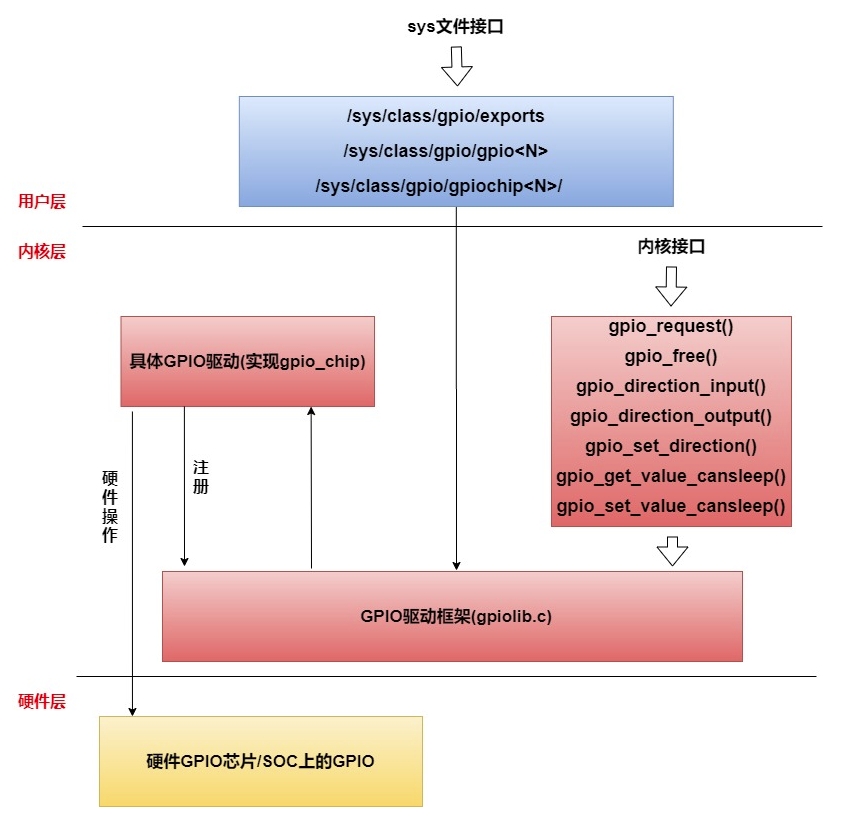
GPIO stands for General-Purpose Input/Output, a type of general-purpose pin that can be dynamically configured and controlled during software runtime. On the RK platform, except for some pins with specific purposes (such as DDR, MIPI, etc.), other pins are GPIO by default if not configured for multiplexing. RK's GPIO driver provides the standard GPIO interface under Linux. Linux has a set of sysfs nodes for user-space GPIO operations. Application-level GPIO programming is mainly achieved by manipulating these nodes.
¶ 1.1 GPIO Pin Naming Rules
Rockchip pin IDs consist of controller (bank) + port (port) + index number (pin).
Under the general Linux framework, all GPIOs are numbered numerically.
For chips on the RK platform, the chip numbering method is: (GPIO controller number - 0) * 32 + (port number - 'A') * 8 + index number
¶ 1.2 Viewing the User-Level Interface of GPIO
# ls -l /sys/class/gpio/
Total 0

--w------- 1 root root 4096 June 16, 09:46 export

lrwxrwxrwx 1 root root 0 June 16, 09:44 gpiochip0 -> ../../devices/platform/pinctrl/fd8a0000.gpio/gpio/gpiochip0

lrwxrwxrwx 1 root root 0 June 16, 09:44 gpiochip128 -> ../../devices/platform/pinctrl/fec50000.gpio/gpio/gpiochip128
lrwxrwxrwx 1 root root 0 June 16 09:44 gpiochip32 -> ../../devices/platform/pinctrl/fec20000.gpio/gpio/gpiochip32
lrwxrwxrwx 1 root root 0 June 16 09:44 gpiochip509 -> ../../devices/platform/feb20000.spi/spi_master/spi2/spi2.0/rk806-pinctrl.0.auto/gpio/gpiochip509
lrwxrwxrwx 1 root root 0 June 16 09:44 gpiochip64 -> ../../devices/platform/pinctrl/fec30000.gpio/gpio/gpiochip64

lrwxrwxrwx 1 root root 0 June 16th 09:44 gpiochip96 -> ../../devices/platform/pinctrl/fec40000.gpio/gpio/gpiochip96

--w------- 1 root root 4096 June 16th 09:46 unexport
¶ 2 GPIO Programming
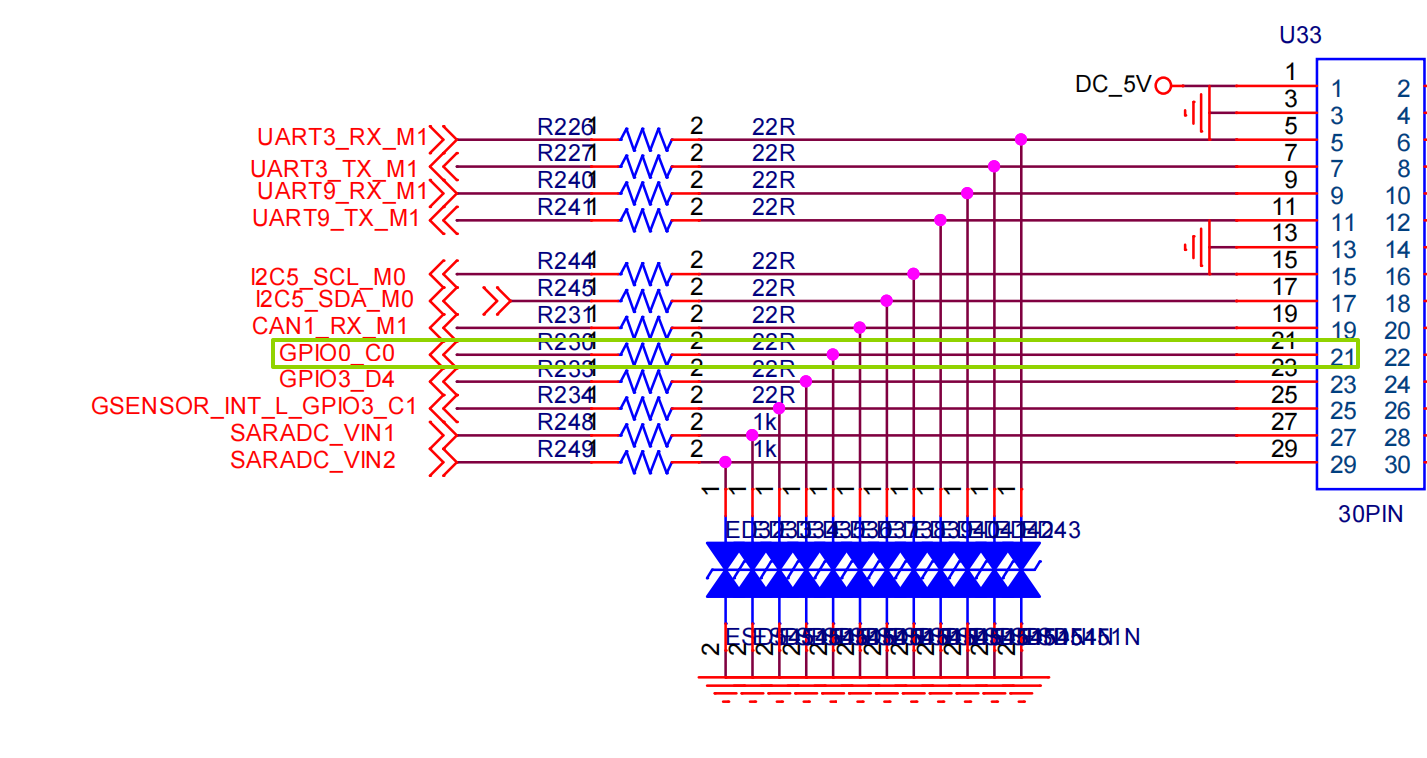
Using youyeetooRJ's GPIO0_PC0 as an example to explain the use of the GPIO user interface
¶ 2.1 Schematic Diagram Location
¶ 2.2 Interface Usage
Set GPIO 16 to User Mode Operation
echo 16 > /sys/class/gpio/export
Set GPIO 16 as Output
echo out > /sys/class/gpio/gpio16/direction
Setting the Level of GPIO 16 as Output
High Level
echo 1 > /sys/class/gpio/gpio16/value
Low Level
echo 0 > /sys/class/gpio/gpio16/value
Setting GPIO 16 as Input
echo in > /sys/class/gpio/gpio16/direction
Reading the Level of GPIO 16 as Input: 1 for high, 0 for low
cat sys/class/gpio/gpio16/value

``` Cancel GPIO 16 user-mode operation
echo 16 > /sys/class/gpio/unexport
## 2.3 GPIO Output PWM Square Wave DEMO

- Readers can control the square wave period by adjusting the time parameter.

```bash

cat GPOI_PWM.sh

#!/bin/bash

echo 16 > /sys/class/gpio/export

echo out > /sys/class/gpio/gpio16/direction

echo 1 > /sys/class/gpio/gpio16/value

while true; do

echo 1 > /sys/class/gpio/gpio16/value

sleep $1 && echo "delay $1"

echo 0 > /sys/class/gpio/gpio16/value

sleep $1 && echo "delay $1" $1"
done

root@linaro-alip:/# ./GPIO_PWM.sh 0.01
delay 0.01
delay 0.01
delay 0.01
...
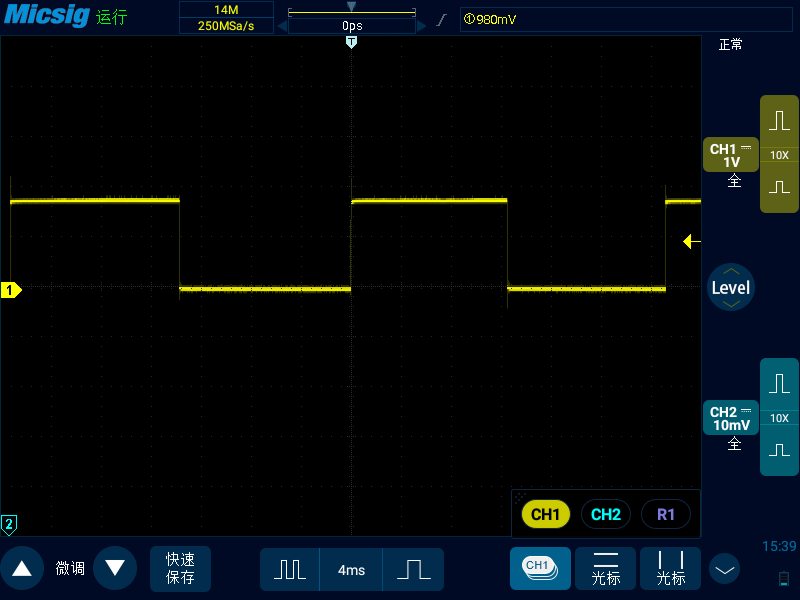
- The phenomenon is shown in the figure