¶ M.2 M-KEY 2280 SSD
Prepare an M.2 E-KEY 2280 SSD
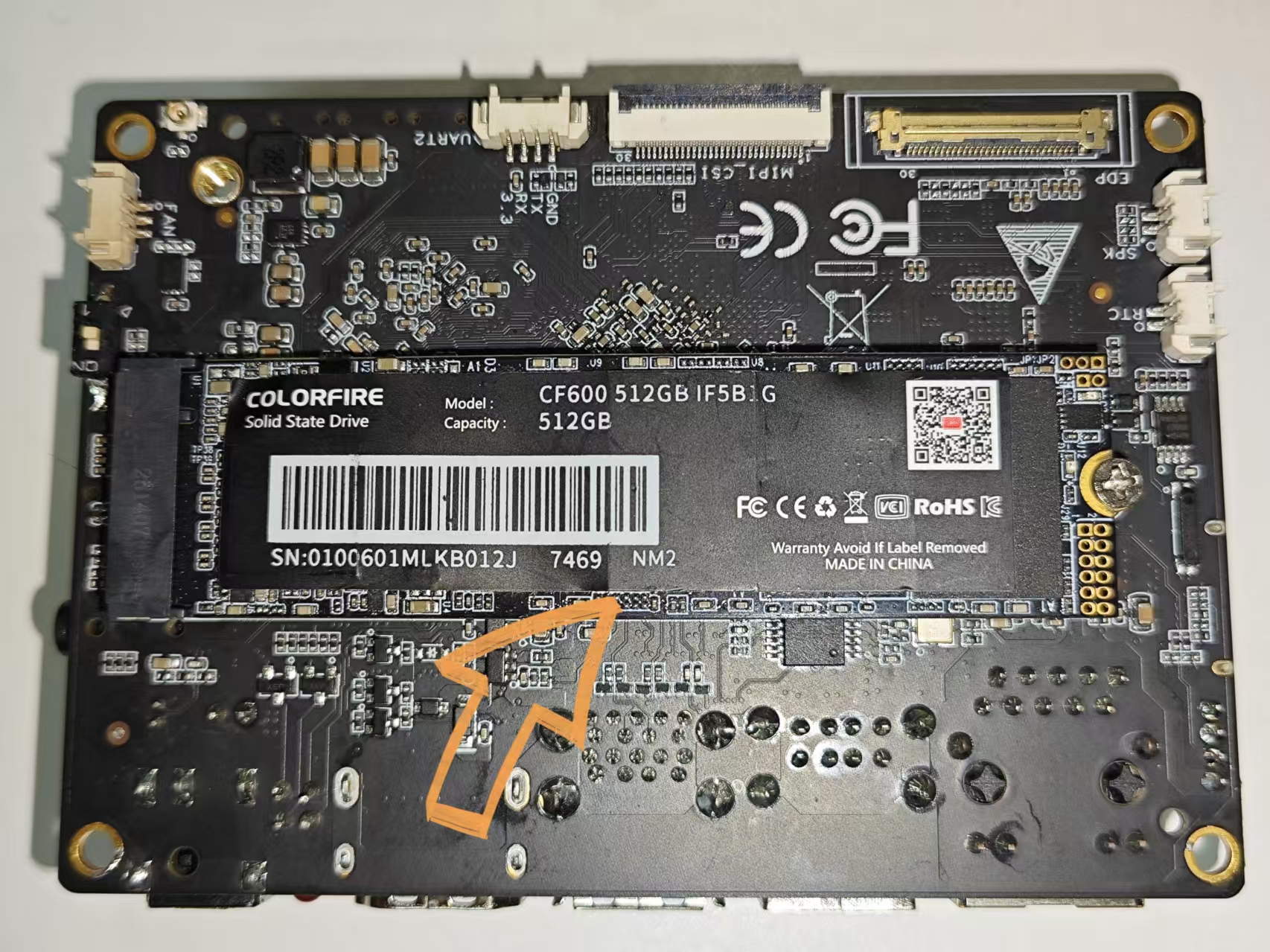
The youyeetooRJ development board has one PCIe 3.0 x 2 interface, which can be used to insert an M.2 M-KEY 2280 SSD that supports the NVMe protocol, as shown in the picture:
¶ 1 Actual Image
¶ 2 Mounting the Disk to the File System
¶ 2.1 Manual Mounting
# View

$ sudo fdisk -l

... Disk /dev/nvme0n1: 476.94 GiB, 512110190592 bytes, 1000215216 sectors
Disk model: CF600 512GB

Units: sectors of 1 * 512 = 512 bytes

Sector size (logical/physical): 512 bytes / 512 bytes

I/O size (minimum/optimal): 512 bytes / 512 bytes

Disklabel type: dos

Disk identifier: 0x3a6ba98f

Device Boot Start End Sectors Size Id Type

/dev/nvme0n1p1 2048 1000215215 1000213168 476.9G 83 Linux

...

# Mount
mkdir -p /mnt/ssd

sudo mount /dev/nvme0n1p1 /mnt/ssd
¶ 2.2 Automatic Mount
¶ 2.2.1 Obtain Device UUID
### View the device's UUID

$ sudo blkid /dev/nvme0n1

$
### If no UUID is output, it means no partitioning has been performed (if it is, you can skip to `view the device's UUID again`).

### Check partition status

$ sudo fdisk -l /dev/nvme0n1
Disk /dev/nvme0n1: 476.94 GiB, 512110190592 bytes, 1000215216 sectors
Disk model: CF600 512GB
Units: sectors of 1 * 512 = 512 bytes
Sector size (logical/physical): 512 bytes / 512 bytes
I/O size (minimum/optimal): 512 bytes / 512 bytes

### If the output shows a partition like /dev/nvme0n1p1, it means there is no partition.

### Creating a Partition (Here we create a primary partition for demonstration)

$ sudo fdisk /dev/nvme0n1

Welcome to fdisk (util-linux 2.38.1).

Changes will remain in memory only, until you decide to write them.

Be careful before using the write command.

Device does not contain a recognized partition table.

Created a new DOS (MBR) disklabel with disk identifier 0x3a6ba98f.

Command (m for help): n
Partition type

p primary (0 primary, 0 extended, 4 free)

e extended (container for logical partitions)

Select (default p): p

Partition number (1-4, default 1):

First sector (2048-1000215215, default 2048):

Last sector, +/-sectors or +/-size{K,M,G,T,P} (2048-1000215215, default 1000215215):

Created a new partition 1 of type 'Linux' and of size 476.9 GiB.

Command (m for help): w

The partition table has been altered.

Calling ioctl() to re-read partition table.

Syncing disks.

### Format the newly created partition to ext4 format

$ sudo mkfs.ext4 /dev/nvme0n1p1
mke2fs 1.47.0 (5-Feb-2023)

Discarding device blocks: done

Creating filesystem with 125026646 4k blocks and 31260672 inodes

Filesystem UUID: d068a5fd-b7bb-4f80-86dd-aa6a036f86d9
Superblock backups stored on blocks:
32768, 98304, 163840, 229376, 294912, 819200, 884736, 1605632, 2654208,
4096000, 7962624, 11239424, 20480000, 23887872, 71663616, 78675968,
102400000

Allocating group tables: done
Writing inode tables: done
Creating journal (262144 blocks): done
Writing superblocks and filesystem accounting information: Done

### Check the device's UUID again

$ sudo blkid /dev/nvme0n1p1

/dev/nvme0n1p1: UUID="d068a5fd-b7bb-4f80-86dd-aa6a036f86d9" BLOCK_SIZE="4096" TYPE="ext4" PARTUUID="3a6ba98f-01"
¶ 2.2.2 Edit the /etc/fstab file
$ cat /etc/fstab

...
UUID="d068a5fd-b7bb-4f80-86dd-aa6a036f86d9" /mnt/ssd ext4 defaults 0 2
¶ 2.2.3 Mount and Verify
### Mount

$ sudo mount -a

mount: (hint) your fstab has been modified, but systemd still uses

the old version; use 'systemctl daemon-reload' to reload.

### Verify (You can see that the mount was successful)

$ df -h
File system Size Used Available Used% Mount point

...
/dev/nvme0n1p1 469G 28K 445G 1% /mnt/ssd

$ sudo lsblk

NAME MAJ:MIN RM SIZE RO TYPE MOUNTPOINTS

...
nvme0n1 259:0 0 476.9G 0 disk

└─nvme0n1p1 259:1 0 476.9G 0 part /mnt/ssd

$ cat /proc/mounts | grep nvme

/dev/nvme0n1p1 /mnt/ssd ext4 rw,relatime 0 0

### Reboot and verify
¶ 3 Read/Write Speed Test
| Protocol\Slot | x1 | x2 | x4 | x8 | x16 |
| --------- | ------- | ------- | ----- | ------ | ------ |
| PCIe 1.0 | 250MB/s | 500MB/s | 1GB/s | 2GB/s | 4GB/s |
| PCIe 2.0 | 500MB/s | 1GB/s | 2GB/s | 4GB/s | 8GB/s |
| PCIe 3.0 | 1GB/s | 2GB/s | 4GB/s | 8GB/s | 16GB/s |
| PCIe 4.0 | 2GB/s | 4GB/s | 8GB/s | 16GB/s | 32GB/s |
The table shows that the maximum transfer rate of PCIe 3.0 x 2 is 2 GB/s.
¶ 3.1 Using the dd command for read/write tests
### Write 1GB of data to disk

$ sudo dd if=/dev/zero of=/dev/nvme0n1p1 bs=1M count=1024 oflag=direct

### Read a 1GB file from disk

$ sudo dd if=/dev/nvme0n1p1 of=/dev/null bs=1M count=1024 iflag=direct
¶ 3.2 Using the fio command for read/write tests
$ sudo apt update

$ sudo `apt install fio`

### Sequential Write Performance Test

$ fio --name=seqwrite --ioengine=sync --rw=write --bs=1M --numjobs=1 --size=10G --runtime=60s --time_based --output-format=normal --direct=1 --filename=/dev/nvme0n1p1

### Sequential Read Performance Test

$ fio --name=seqread --ioengine=sync --rw=read --bs=1M --numjobs=1 --size=10G --runtime=60s --time_based --output-format=normal --direct=1 --filename=/dev/nvme0n1p1

### Random Write Performance Test

$ fio --name=randwrite --ioengine=sync --rw=randwrite --bs=4k --numjobs=8 --size=10G --runtime=60s --time_based --output-format=normal --direct=1 --filename=/dev/nvme0n1p1

### Random Read Performance Test

$ fio --name=randread --ioengine=sync --rw=randread --bs=4k --numjobs=8 --size=10G --runtime=60s --time_based --output-format=normal --direct=1 --filename=/dev/nvme0n1p1

### Multi-threaded Performance Test

$ fio --name=multiwrite --ioengine