¶ Brief introduction
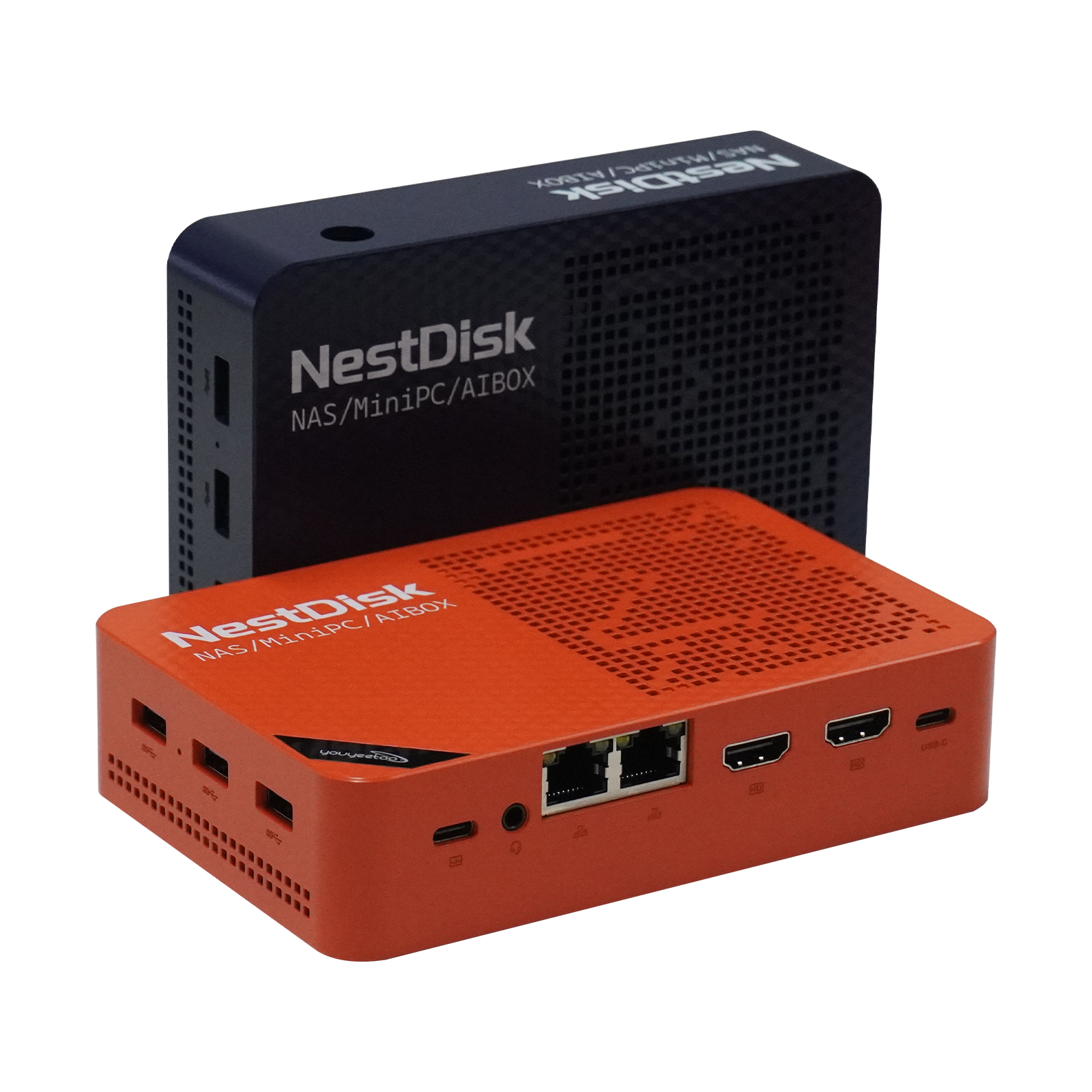
Nest Disk NAS is an ultra-compact mini host, with "small size to carry full functions" as the core, with the energy efficiency advantages of the Intel N150 quad-core processor, integrating multiple attributes such as [NAS storage], [soft routing], [office host], and [light entertainment terminal], the size of a palm but can carry the needs of multiple scenarios, making it the best choice for pursuing space utilization and functional integration.
¶ Core highlights
Performance base: Intel N150 quad-core processor
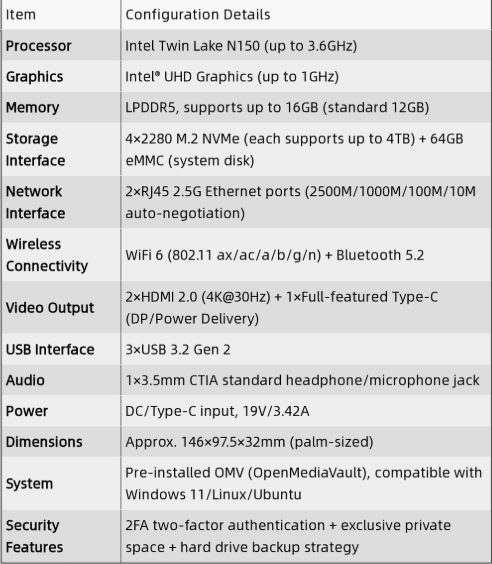
Equipped with Intel® N150 quad-core processor (based on 10nm process), the default frequency is 1.6GHz, and the turbo frequency can reach 3.6GHz, which can efficiently cope with daily office, lightweight data processing, multimedia decoding and other tasks with low power consumption, taking into account performance and energy saving, and is stable and quiet for long-term operation.
Storage freedom: Four-bay expansion, NAS easy to play
With 4 NVME hard drive bays (supporting hard disks/SSDs), you can set up a personal cloud storage center.
Home users: centralized backup of photos, videos, and documents, and access them at any time on mobile phones/computers;
Studio: Sharing project files, multi-device collaboration is more efficient;
Multi-screen and expansion: Triple screen 4K + Type-C one-line communication
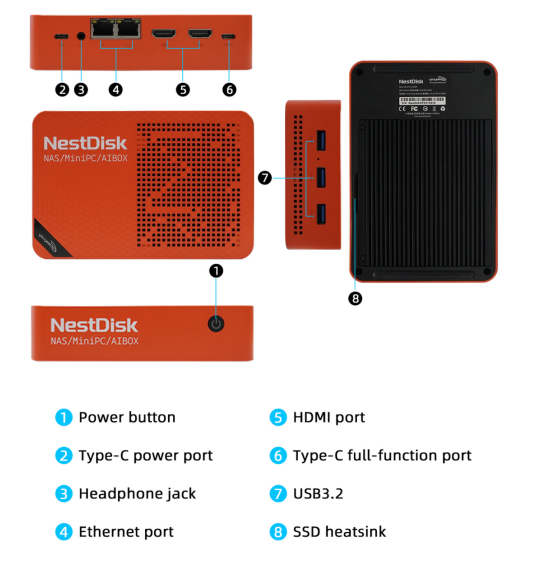
Display output: Equipped with 2 HDMI ports + 1 Type-C video output, supports up to three screens 4K@60Hz simultaneous display, multi-screen office (document + table + web page split screen), creative design (material + software + preview screen) efficiency.
Type-C Connection: A single Type-C interface can achieve "video transmission + data transmission + power supply" at the same time, and when connecting to an external monitor that supports Type-C, all connections can be done with one cable, making the desktop more concise.
Memory and Response: 12G DDR5 memory comes
standard with 12GB DDR5 memory (high frequency and low latency), which increases bandwidth by about 50% compared to DDR4, and multitasking (such as simultaneous opening of documents, browsers, and lightweight software) is smoother, and it also provides ample running space for lightweight services such as virtual machines and containers.
¶ Product Specifications
¶ OMV (OpenMediaVault) User Guide
OMV (OpenMediaVault) is a comprehensive tutorial collection for Nest Disk NAS. This section provides beginners with a series of OMV (OpenMediaVault) tutorials, helping them quickly understand core features like device installation, account management, and file transfer, enabling them to master Nest Disk NAS in no time.
Video Tutorial: Watch the Nest Disk NAS tutorial on YouTube
¶ System installation support
Tutorial link:openmediavault - DATA SOVEREIGNTY MADE EASY
Tool firmware link:https://drive.google.com/drive/folders/1w6OlXrZz_lhr4weyHbDXiMSbwCJM2fep?usp=drive_link
OMV Upgrade Tutorial: https://www.kdocs.cn/l/cnVjMBzO308E
Guide to Disabling eMMC Boot Option in BIOS + Formatting eMMC
Overseas AliExpress:Youyeetoo Official Store(Free shipping to the European Union/United States)
¶ Install Ubuntu 24.04.3
- Installing the Ubuntu System - Download Ubuntu from the official website and install it on the board