¶ 01 Development Environment Setup
This chapter describes how to set up a complete cross-compilation development environment for youyeetoo-Pico-G1.
¶ 1 Environment Overview
Because the target board (youyeetoo-Pico-G1) has limited resources, it cannot run development and debugging tools. Programs are therefore compiled, linked, and relocated on a powerful host machine, and the resulting executables are then flashed to the target board. This is the classic "host + target (evaluation board)" cross-compilation model.
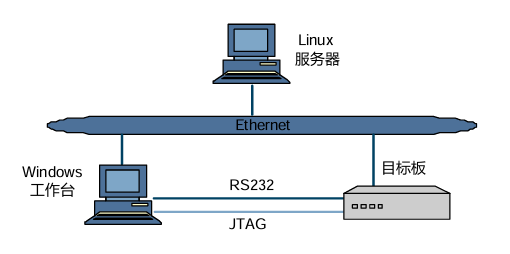
A typical development environment consists of the following parts, all on the same network:
- Linux server: acts as the cross-compilation environment and performs SDK compilation and builds.
- Windows workstation: connects to the Linux server remotely over SSH with tools such as MobaXterm, and connects to the target board through serial port / Ethernet / USB for running debugging tools and flashing software.
- Target board (youyeetoo-Pico-G1): runs the final system image and applications.
Note
A Windows workstation is used in this environment, but many tasks (for example, using minicom instead of a terminal emulator) can also be done on the Linux server. Choose whichever suits you.
¶ 2 Setting Up the Linux Compilation Server
The following steps use the recommended 64-bit Ubuntu 18.04 system as an example.
Important
A 64-bit Linux server is strongly recommended. This development package may have unknown compatibility issues on 32-bit Linux servers, older Linux server versions, or uncommon Linux distributions.
¶ 2.1 Recommended Hardware and System Configuration
A 64-bit Linux server is recommended to ensure compatibility with the development package. The recommended configuration is:
- CPU: Intel(R) Xeon(R) CPU E5-2450 0 @ 2.10GHz or better
- Memory (DDR): >= 16GB
- Disk: >= 600GB
- Network: Gigabit Ethernet
- Operating system: Ubuntu 18.04 64bit
This development package was built and verified with the following Linux version:
Linux version 4.15.0-192-generic (gcc version 7.5.0 (Ubuntu 7.5.0-3ubuntu1~18.04)) #203-Ubuntu SMP Wed Aug 10 17:40:03 UTC 2022
¶ 2.2 Network Environment
Configure the network yourself and install network components such as NFS, Samba, and SSH:
sudo apt-get install nfs-kernel-server samba ssh
Note
After the network is configured, make sure the Linux server, the Windows workstation, and the target board are on the same LAN and can ping each other.
¶ 2.3 Installing Dependency Packages
After the operating system is installed and the network is configured, install the required software packages as follows.
¶ Step 1: Configure bash as the default shell
sudo dpkg-reconfigure dash
Select No in the dialog that appears to switch the default shell from dash to bash.
¶ Step 2: Install base packages
sudo apt-get install make libc6:i386 lib32z1 lib32stdc++6 zlib1g-dev libncurses5-dev ncurses-term libncursesw5-dev g++ u-boot-tools:i386 texinfo texlive gawk libssl-dev openssl bc
¶ Step 3: Fix third-party library build failures on 64-bit systems
Create an empty /etc/ld.so.preload file so that certain third-party libraries can be built on a 64-bit Linux server:
sudo touch /etc/ld.so.preload
sudo bash -c 'echo "" > /etc/ld.so.preload'
¶ Step 4: Install gperf
Install gperf to resolve the eudev-3.2.7 build failure:
wget http://ftp.gnu.org/pub/gnu/gperf/gperf-3.1.tar.gz
tar -xzf gperf-3.1.tar.gz
cd gperf-3.1
./configure
make
sudo make install
¶ Step 5: Install mtd-utils dependencies
mtd-utils 2.0.2 depends on the following libraries:
sudo apt-get install zlib1g-dev liblzo2-dev uuid-dev pkg-config
Set the pkg-config search path:
export PKG_CONFIG_PATH="$PKG_CONFIG_PATH:/usr/lib/x86_64-linux-gnu/pkgconfig"
¶ Step 6: Install automake 1.15.1
mtd-utils 2.0.2 depends on automake 1.15.1, which must be installed manually:
1. Remove the existing automake
sudo apt-get autoremove automake
2. Download automake 1.15.1
wget ftp://ftp.gnu.org/gnu/automake/automake-1.15.1.tar.gz
3. Build and install
tar zxvf automake-1.15.1.tar.gz
cd automake-1.15.1/
./configure
make
sudo make install
¶ 2.4 Getting the SDK
Note
Install git according to your Linux distribution.
¶ 1. Clone the SDK
- GitHub
git clone https://github.com/ShiMetaPi/shimetapi_pico_gx.git
- Gitee
git clone https://gitee.com/ShiMetaPi_0/shimetapi_pico_gx.git
¶ 2. Configure the cross-compilation toolchain path
Important
Cross toolchains obtained from other sources may not match the kernel in use, which can cause unexpected problems during development. Always use the cross toolchain bundled with the SDK.
The SDK release package includes its own toolchain. Enter the SDK root directory and run the following command to add the toolchain path to the environment variables:
cd sdk
source ./build/env.sh
This command adds the compiler path under sdk/tools/linux/toolchains to the PATH environment variable so the compiler can be used inside the SDK.
Tip
Each time you open a new terminal for compilation, run
source ./build/env.shfirst to load the environment variables, or use therun.shscript for building.
¶ 3. Verify the SDK
Enter the SDK root directory, perform one build and one flash cycle, and verify that the firmware can be flashed to youyeetoo-Pico-G1 and boots successfully.
For details, refer to Image Build, Image Flashing, and System Login.